How to Check If a Number Is VoIP: Lookups, Line Types and What to Do When Apps Refuse It (2026)
The short answer
- To check if a number is VoIP, ask the carrier that serves it or run a line-type lookup; Twilio's, for example, returns mobile, landline, fixedVoip or nonFixedVoip.[2]
- Your own number can show as VoIP if an internet phone service now serves it: porting to Google Voice removes the number from your carrier, and Twilio classes Google Voice as non-fixed VoIP.[8][2]
- "VoIP numbers are not supported" means the app's lookup returned a VoIP type and its rules refuse it. WhatsApp, OpenAI and Discord all refuse VoIP numbers in their help pages.[10][3][4]
- A VoIP result on a number that called you isn't proof of a scam: the US had 63 million interconnected VoIP subscriptions in June 2025, and caller ID can be faked anyway.[1][12]
- Use a mobile number you own for accounts you'll keep. A one-time number fits only low-stakes sign-ups on apps that allow temporary numbers, and the app still decides.
To check if a number is VoIP, ask the carrier or provider that serves it, or run a line-type lookup on it. A lookup sends the number to a data service and returns its type: mobile, landline, fixed VoIP, non-fixed VoIP or a special type such as toll-free. Apps run the same kind of check when you sign up. If it comes back as VoIP, any app that refuses VoIP will reject the number, even if it's your real, everyday number.
If you're after the definition of the term itself, it's on the non-VoIP number page, which covers what the term means and what it can't do. This post is the practical side: checking a number and dealing with the refusal.
Disclosure: I built TwoLine, which sells one-time numbers, some of them on lines labeled "Premium · Non-VoIP".
How to check if a number is VoIP
A few terms first, one sentence each. VoIP (Voice over Internet Protocol) is phone service that carries calls and texts over an internet connection instead of a mobile radio network or a copper wire. Line type is the category a number falls into in numbering and carrier records. A line-type lookup (or carrier lookup) is a query that returns that category and, usually, the carrier's name.
This is how I'd check a number, starting with the cheapest and most reliable step.
- Ask whoever serves the number. Your carrier or phone provider knows whether it's a mobile line, a landline or a VoIP service. It's also the only party that can fix its own records if they're wrong.
- Think about how the number works. If it lives inside an app and works over Wi-Fi with no SIM, it fits Twilio's definition of non-fixed VoIP: a virtual number you get online without any physical device.[2] If it came with a SIM or eSIM from a mobile carrier, it should be mobile. If it's a broadband home or office phone, it's probably fixed VoIP.[13]
- Run a line-type lookup. Developers can call Twilio's Lookup with the line type field and read the type in the response; Twilio says the data covers phone numbers worldwide, with Canadian numbers needing special approval.[2] Other vendors sell similar lookups, and free lookup sites exist too. Use lookups to screen a number, not to track a person.
- Read the app's error message. It's often specific. Discord's "invalid phone number" error is where it tells you VOIP, burner and landline numbers can't be used.[4]
- Read the app's help page. OpenAI's, for one, lists the number types it won't take.[3]
Is there a free website that tells you for sure? Not for sure. Any lookup is only as current as the records behind it, and different vendors build their data in their own ways. The app you're trying to use may see something different from what a free checker shows you. For your own number, your carrier's answer is the one that counts.
What a line-type result means
Twilio's documentation is a useful reference because it spells the categories out. Its line type check returns values such as mobile, landline, fixedVoip and nonFixedVoip, plus special types like tollFree, premium, voicemail and pager.[2] It defines fixed VoIP as a virtual number tied to a physical device, with a cable company's home phone service (Comcast) among its examples.[13] Non-fixed VoIP is a number you get online without any physical device, and its example is Google Voice.[2] Twilio also notes carrier data isn't available for types such as toll-free, premium, voicemail or pager, so the carrier name comes back empty for those.[2]
| Result | What it is, in one line | Typical example | What the help pages I read say |
|---|---|---|---|
| Mobile (wireless) | A number on a mobile network, on a physical SIM or an eSIM | Your phone contract or a prepaid SIM | The type Discord's verification steps ask for: a valid mobile number.[4] |
| Landline | A wired home or office line | A traditional home phone | Twilio says landlines generally can't receive SMS, so text codes usually won't land.[2] OpenAI, Discord and WhatsApp all refuse them.[3][4][10] |
| Fixed VoIP | Internet phone service tied to a device or an address | Broadband home phone, office phone systems | OpenAI, Discord and WhatsApp refuse "VoIP" without splitting fixed from non-fixed.[3][4][10] |
| Non-fixed VoIP | A number you get online, with no hardware | App-based numbers such as Google Voice | OpenAI names Google Voice numbers as unsupported.[3] |
A VoIP result doesn't mean "fake". In June 2025 the US had 395 million mobile subscriptions, 63 million interconnected VoIP subscriptions and 15 million old-style switched access lines, according to the FCC.[1] The FCC counts interconnected VoIP as service that needs a broadband connection from the user's location and can make and receive calls on the ordinary phone network.[1] That's tens of millions of ordinary home and business phones, which is why a blanket VoIP ban sometimes catches honest people too.
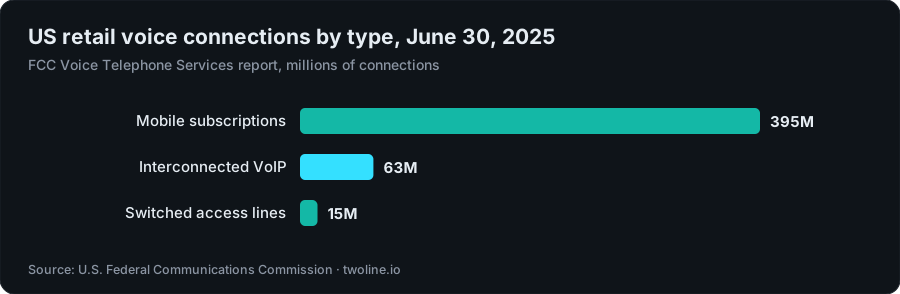
Chart data
| Connection type | Connections (millions) |
|---|---|
| Mobile subscriptions | 395M |
| Interconnected VoIP | 63M |
| Switched access lines | 15M |
Checking a number that called or texted you
Plenty of people asking "is this number VoIP?" aren't fighting a sign-up form. They've had a call or a text from a number they don't know, and they want to know what's behind it. A lookup can help, with two caveats.
First, a lookup describes the number shown, not the person calling. Caller ID can be faked: the FCC defines spoofing as a caller deliberately falsifying the information sent to your caller ID display to disguise their identity.[12] It also warns that you may not be able to tell right away if an incoming call is spoofed.[16] So a "mobile" result doesn't prove a call is safe, and the number on your screen may belong to someone who never called you.
Second, a VoIP result isn't proof of a scam. As the chart above shows, tens of millions of US home and business lines are VoIP.[1] Free lookup sites give you a best guess from whatever records they hold, and that guess may not match what a carrier or an app sees.
So judge the request, not the line type. The FCC's advice is that if someone says they represent a company or a government agency, you hang up and call the phone number on your account statement or on the organization's own website.[17] A lookup is a screening tool, nothing more.
Why is my phone number VoIP?
You've had the number for years, it's yours, and an app still calls it VoIP. There are a few common reasons.
You moved it to an internet phone service
Porting is the big one. When you port a mobile number to Google Voice, Google's own help page says that after the port, the number is automatically removed from your carrier, and your plan may be canceled.[8] The number is now served by Google Voice, and Twilio's lookup docs use Google Voice as their example of non-fixed VoIP.[2] Same digits, new line type. The same logic applies when you move a number to any internet calling or business phone provider: a lookup is meant to reflect whoever serves the number now, not who served it when you got it.
It's a home or office line on broadband
If your "landline" comes from a cable or broadband company, or your work number runs on an office phone system, it may well be fixed VoIP. Twilio's fixed VoIP definition is a virtual number tied to a physical device, and its example is a cable company's home phone service.[13] Nothing's wrong with the number. It's just not what strict apps want.
It lives in an app
Numbers handed out by calling and texting apps that work over Wi-Fi with no SIM fit Twilio's non-fixed VoIP definition, whatever the app's marketing says.[2] I cover why those numbers trip filters in why free phone number apps fail verification, and how they differ from eSIMs and other virtual numbers in VoIP vs virtual number vs eSIM.
The records are wrong or out of date
Sometimes a genuine mobile number is simply filed under the wrong type. If you've never ported it and it sits on an ordinary mobile plan, ask your carrier how the line is recorded and whether a recent change, such as a port or a switch of plan, could explain it. Retrying the app won't fix someone else's database.
What "VoIP number not supported" means
When an app says "VoIP numbers are not allowed" or "this number type isn't supported", it's telling you three things. Its lookup returned a VoIP type (or landline, or another refused type). Its policy refuses that type. And retrying the same number won't change the answer.
Behind that message, the order of events is roughly this:
- The lookup. Before sending anything, the app or its verification vendor queries a line-type service like the one described above.[2]
- The policy. The app compares the type with its own rules, and those differ from app to app. OpenAI, Discord and WhatsApp, for example, refuse VoIP numbers in general.[3][4][10]
- The other signals. Line type is one input among several. NIST's current authentication guidance tells verifiers to consider risk indicators such as a device swap, a SIM change or a recent number port before sending a code over the phone network.[14] Discord's help page also lists a timeout for numbers that were recently used, and it won't take a number already tied to another Discord account.[4]
- The send. Only then does the code go out. OpenAI's help page, for instance, says codes go by SMS or, in some countries, WhatsApp, never by email or phone call.[3]
Not every refusal is about line type, so read the wording. Discord separates "invalid phone number" errors from "recently used" and "existing account" errors.[4] A rate limit means wait. An existing account means the number's already taken. Only the first one is about the number being VoIP. If the code never shows up at all, that's a different problem, and I go through it in what to check when a verification code isn't received.
Why apps refuse VoIP numbers
There are two honest reasons, and they're worth separating: proof that you hold a device, and the cost of fake accounts.
Proof of possession
A phone code is meant to prove you hold something, and NIST's digital identity guidelines used to prohibit VoIP phone numbers for exactly this kind of out-of-band code. The current authentication guidelines, revised in 2025, list in their change log that they remove that prohibition.[9] They treat the phone network as a restricted channel for these codes and ask verifiers to weigh risk signals instead.[15][14] So NIST no longer bans VoIP outright. When an app blocks VoIP in 2026, that's the app's own choice.
Fraud and fake accounts
The reasons apps give are about abuse. OpenAI's help center says landlines, VoIP numbers, Google Voice numbers and premium numbers (premium-rate numbers, unrelated to TwoLine's "Premium" label) aren't supported because these types are "often associated with higher instances of fraud".[3] Discord's says VOIP, burner and landline numbers can't be used, and explains that verification helps prove you're not a robot and keeps spammers out.[4]
The economics are simple. A mobile number usually means a SIM from a carrier. A non-fixed VoIP number, by Twilio's own definition, needs no physical device at all.[2] For someone trying to open accounts by the thousand, that difference matters a lot, and the scale of fake sign-ups is huge. Meta took action against 692 million fake Facebook accounts in Q3 2025 and 1.1 billion in Q4 2025.[5] It then reported 1.2 billion in Q1 2026 and 822 million in Q2 2026.[6] Add those four quarters and it's roughly 3.8 billion fake accounts actioned in a year.[5][6] Microsoft's April 2025 Cyber Signals report says it blocked about 1.6 million bot signup attempts per hour and thwarted $4 billion in fraud attempts.[7]
To be fair to those numbers: neither Meta nor Microsoft ties them to VoIP. I'm citing them for scale, to show the problem a phone check is trying to slow down. A line-type filter is a cheap first gate against that flood, even though it sometimes blocks honest people with VoIP numbers.
What to do when an app refuses your number
Once you know the type, the fix is usually obvious. Start with the official routes, because they're the right answer for most people.
- Use a mobile number you own. A SIM or eSIM from a mobile carrier is classed as mobile because it is mobile. For anything you'll keep, such as email, your Apple or Google account, work tools, or WhatsApp, this is the number to use.
- If you ported your main number to a VoIP service, you may need a carrier line for strict apps. If your phone supports dual SIM or eSIM, a cheap prepaid plan from a carrier gives you a second mobile number you control, and later codes and account recovery keep working.
- If your real mobile number is misclassified, ask your carrier to check how the line is recorded, then try again later.
- If you think the refusal is a mistake, contact the app. Discord's help page, for example, points users to its support team when verification problems persist.[4]
- If the app's own terms rule out virtual, temporary or burner numbers, use a number you own. Discord's, for one, rules out burner numbers.[4] A label doesn't change an app's rules, and I'd rather you didn't try to route around them.
- If you need one code for a low-stakes sign-up on an app whose rules allow temporary numbers, and you'd rather not hand over your own number, a one-time number is an option. TwoLine sells them. For how one-time numbers work in general, read one-time phone number for verification.
Will a "non-VoIP" number fix it?
Sometimes, and only partly. A number labeled non-VoIP was reported as mobile when it was classed. If an app's only objection is line type, and its lookup agrees, that filter may not be what stops you. What the label can't tell you is whether the app uses the same data, whether the number is fresh for that app, whether your other signals look normal, or whether the app's rules will change next month.[4][14] If a seller promises a non-VoIP number will pass every app, they're promising something only the app can give. I won't make that promise, and TwoLine doesn't publish a delivery or success rate. The app decides.
Can I use a VoIP number for WhatsApp?
No, not by WhatsApp's own rules. Its help center lists VoIP numbers, landlines and toll-free numbers among the number types that can't be registered on WhatsApp.[10] Its troubleshooting steps also ask you to make sure you have an active SIM card in your phone for the number you want to register, one that can receive SMS or phone calls.[11]
So if your number shows as VoIP, WhatsApp isn't the app to argue with. Put WhatsApp on a mobile number you own. It's also an account most people keep for years, and if WhatsApp ever asks you to verify again, you'll need that same number. If your own mobile number is being refused and you're sure it isn't VoIP, check the line type with your carrier first, using the steps at the top of this post.
What TwoLine's Premium · Non-VoIP label covers
The term itself is explained on the non-VoIP number page; this section is only about what the label means on TwoLine. TwoLine sells one number per code. You search the app, pick a country and a line, and see the live price before you pay, with no account needed to look. Lines carry labels such as "Premium · Non-VoIP", "Standard+" and "Virtual". The Premium · Non-VoIP label comes from the line's source: it's how that number is classed where it comes from. It isn't a test I ran against your app, and it isn't a promise that your app will accept it. Discord's rule against burner numbers covers exactly this kind of one-time number, so expect some apps to say no whatever the label.[4] The app decides.
I checked the catalog on November 2, 2026, at 10:19 UTC, for 12 popular apps in 11 countries. Premium · Non-VoIP lines showed up only on US numbers, for 8 of the 12 apps. I've left WhatsApp off the list below: its help center asks for an active SIM in your phone for the number you register.[11] The list shows the cheapest Premium · Non-VoIP line for each, next to the cheapest line of any label in the US. Prices are live, and they change:
- Facebook: Premium · Non-VoIP from $0.56 (any line from $0.39)
- Google: Premium · Non-VoIP from $1.22 (any line from $0.46)
- Microsoft: Premium · Non-VoIP from $0.39 (any line from $0.39)
- Snapchat: Premium · Non-VoIP from $0.39 (any line from $0.39)
- Telegram: Premium · Non-VoIP from $2.04 (any line from $0.93)
- TikTok: Premium · Non-VoIP from $0.39 (any line from $0.39)
- Uber: Premium · Non-VoIP from $0.39 (any line from $0.39)
Discord, Instagram, OpenAI and X had no Premium · Non-VoIP line in the US when I looked. The label isn't always a premium price, either: for four of the eight apps, it tied for the cheapest line at $0.39, the lowest price anywhere in the catalog that day. You can browse current US lines on the US numbers page and see how prices work on the pricing page.
The limits:
- One number, one code. It ends after that, usually within 10 to 20 minutes, and can't receive later codes, so it's not for accounts you'll need to recover.
- Apps may refuse any number, Premium · Non-VoIP or not.
- Not sold for banks, payment apps, money transfer, crypto exchanges, securities accounts or government identity services.
- If no code arrives, the full price returns to your TwoLine balance, not your card. The refund policy has the details.
Decision table: what your result means for you
Find your situation in the left column.
| Your situation | What to do | Why |
|---|---|---|
| Your own mobile number shows as VoIP, and you've never ported it | Ask your carrier how the line is recorded | It's a records problem. Retrying the app won't fix it. |
| You ported your number to Google Voice or another internet phone service | Use a carrier mobile line for strict apps | The number is now served as VoIP, and apps that refuse VoIP will keep refusing it. |
| A number that called or texted you shows as VoIP | Judge the request, not the line type | Caller ID can be faked, and millions of ordinary lines are VoIP.[12][1] |
| An account you'll keep and may need to recover (email, Apple or Google account, work tools, WhatsApp) | Your own mobile SIM or eSIM | Later codes and recovery go to a number you control. A one-time number can't receive them. |
| Bank, payment app, money transfer, crypto exchange, brokerage or government ID | Your own SIM, in your name | These tie the number to your identity. TwoLine doesn't sell numbers for them. |
| The app's own terms rule out virtual, temporary or burner numbers | A number you own | A label doesn't change an app's terms. Discord's, for one, rule out burner numbers.[4] |
| A one-time, low-stakes sign-up where the app refuses VoIP but doesn't bar temporary or burner numbers | A one-time number on a Premium · Non-VoIP line, where one exists | Only where the app's rules allow temporary numbers. The app still decides, and the number ends after one code. |
| A one-time, low-stakes sign-up where the app allows temporary numbers and says nothing about line types | The cheapest line listed for that app | No need to pay for a label nobody asked for. If no code arrives, the full price returns to your balance. |
The short version? Check the type with your carrier first, read the app's error before you retry, and remember that "non-VoIP" is a line-type label, not a pass. Use your own number for anything that matters, and treat any one-time number, mine included, as a tool for one low-stakes code on apps that allow it.
One low-stakes sign-up, without your own number?
Search your app, pick a country and see each line's label and live price before you pay. One number, one code. The app still decides whether to accept it, and if no code arrives, the full price returns to your TwoLine balance.
Check live pricesFAQ
How do I check if a number is VoIP?
Ask the carrier or provider that serves it, since it knows the line type. You can also run a line-type lookup, such as Twilio's, which returns mobile, landline, fixedVoip, nonFixedVoip or a special type.[2] Use lookups to screen a number, not to track a person.
Why is my phone number showing as VoIP?
The most common reason is that an internet phone service now serves it. Porting a number to Google Voice removes it from your carrier, and Twilio uses Google Voice as its example of non-fixed VoIP.[8][2] Broadband home and office phones count as fixed VoIP,[13] and sometimes the records are simply wrong, which only your carrier can fix.
Is a call from a VoIP number a scam?
Not by itself. The US had 63 million interconnected VoIP subscriptions in June 2025,[1] and caller ID can be faked,[12] so a lookup can't tell you who called. Judge the request, not the line type: if a caller says they represent a company or agency, the FCC's advice is to hang up and call the number on your account statement or the organization's own website.[17]
What does "VoIP numbers are not supported" mean?
It means the app's lookup returned a VoIP type and its policy refuses that type, so retrying the same number won't help. OpenAI says it refuses VoIP and Google Voice numbers because those types are often associated with fraud, and Discord says VOIP, burner and landline numbers can't be used.[3][4] Use a mobile number you own, or contact the app if you think it's a mistake.
Can I use a VoIP number for WhatsApp?
No, not by WhatsApp's own rules. Its help center says VoIP numbers, landlines and toll-free numbers can't be registered on WhatsApp.[10] Its troubleshooting steps also ask for an active SIM card in your phone for the number you register, so put WhatsApp on a mobile number you own.[11]
What's the difference between fixed and non-fixed VoIP?
Fixed VoIP is an internet phone line tied to a physical device, like a broadband home phone; Twilio names Comcast's service as an example.[13] Non-fixed VoIP is a number you get online with no hardware, such as Google Voice.[2] The OpenAI, Discord and WhatsApp help pages I read refuse VoIP without splitting the two.[3][4][10]
About this article
Written by Serhat Doğan, founder of TwoLine. He's a London-based software developer who has built SMS verification tools full-time since early 2026. Disclosure: I built TwoLine, which sells one-time numbers for a single SMS code, so I have a stake in this topic. Every outside number in this guide links to its source below. TwoLine doesn't publish delivery measurements of its own, and no app promises to accept any number, ours included.
Find me on GitHub, LinkedIn and X. Read the refund policy, privacy policy and terms, or contact support.
Sources
- U.S. Federal Communications Commission, “Voice Telephone Services: Status as of June 30, 2025”, 2026-05. docs.fcc.gov/public/attachments/DOC-421558A1.txt (accessed 2026-11-02)
- Twilio Docs, “Line Type Intelligence (Lookup v2 API)”, 2026-07-24. www.twilio.com/docs/lookup/v2-api/line-type-intelligence (accessed 2026-11-02)
- OpenAI Help Center, “What does phone verification look like?”. help.openai.com/en/articles/8983040-what-does-phone-verification-look-like (accessed 2026-11-02)
- Discord Support, “How to Verify Your Discord Account”. support.discord.com/hc/en-us/articles/6181726888215-How-to-Verify-Your-Discord-Account (accessed 2026-11-02)
- Meta (EU Code of Conduct on Disinformation Transparency Centre), “Report under the 2022 Code of Conduct on Disinformation, July to December 2025”, 2026-03. www.disinfocode.eu/reports/meta/8 (accessed 2026-11-02)
- Meta (EU Code of Conduct on Disinformation Transparency Centre), “Report under the 2022 Code of Conduct on Disinformation, January to June 2026”, 2026-09. www.disinfocode.eu/reports/meta/9 (accessed 2026-11-02)
- Microsoft Security Blog, “Cyber Signals Issue 9: AI-powered deception: Emerging fraud threats and countermeasures”, 2025-04-16. www.microsoft.com/en-us/security/blog/2025/04/16/cyber-signals-issue-9-ai-powered-deception-emerging-fraud-threats-and-countermeasures (accessed 2026-11-02)
- Google Voice Help, “Port your Google Voice number”. support.google.com/voice/answer/1065667?hl=en (accessed 2026-11-02)
- National Institute of Standards and Technology, “NIST SP 800-63B-4, Digital Identity Guidelines: Authentication and Authenticator Management”, 2025-07. pages.nist.gov/800-63-4/sp800-63b.html (accessed 2026-11-02)
- WhatsApp Help Center, “Can't complete registration”. faq.whatsapp.com/1120385166078156/?locale=en_US (accessed 2026-11-02)
- WhatsApp Help Center, “Can't complete registration (phone number or SIM card issues)”. faq.whatsapp.com/1120385166078156/?locale=en_US (accessed 2026-11-02)
- U.S. Federal Communications Commission, “Caller ID Spoofing”, 2024-11-13. www.fcc.gov/consumers/guides/spoofing (accessed 2026-11-02)
- Twilio Docs, “Line Type Intelligence (Lookup v2 API), fixed VoIP definition”, 2026-07-24. www.twilio.com/docs/lookup/v2-api/line-type-intelligence (accessed 2026-11-02)
- National Institute of Standards and Technology, “NIST SP 800-63B-4, Digital Identity Guidelines (PSTN risk indicators)”, 2025-07. pages.nist.gov/800-63-4/sp800-63b.html (accessed 2026-11-02)
- National Institute of Standards and Technology, “NIST SP 800-63B-4, Digital Identity Guidelines (restricted authenticators)”, 2025-07. pages.nist.gov/800-63-4/sp800-63b.html (accessed 2026-11-02)
- U.S. Federal Communications Commission, “Caller ID Spoofing (how to avoid spoofing)”, 2024-11-13. www.fcc.gov/consumers/guides/spoofing (accessed 2026-11-02)
- U.S. Federal Communications Commission, “Caller ID Spoofing (calls from companies or agencies)”, 2024-11-13. www.fcc.gov/consumers/guides/spoofing (accessed 2026-11-02)