Verification Code Not Received? 16 Causes, the Fix for Each, and Official Help Links
The short answer
- Check the path before blaming the app: no signal, a wrong country code, a filter hiding the text, a carrier block, or a cooldown after too many requests are the usual causes.
- On iPhone, check the Unknown Senders filter; if you used Filter Unknown Senders on iOS 18, screening is on after you upgrade to iOS 26.[7] On Android, check Spam & blocked.[12]
- Request one code, wait the full timer, and use only the newest code.[10] Google says to wait 24 hours if you hit its recovery-code limit.[8]
- Email codes hide in Spam or inbox tabs like Updates; mark the sender Not spam.[16]
- If an app refuses your number for a one-off signup, a one-time number is one option, but it receives one code only and the app still decides.
If your verification code isn't arriving, it's almost always one of a few things: your phone has no usable signal, the number was typed with the wrong country code, a filter on your phone hid the text, your carrier is blocking the sender, or the app has put you on a cooldown after too many requests. Fix them in that order. Check signal, check the number, open the filtered and spam folders, wait out any timer, then ask for a voice call or another sign-in method. If the code comes by email, check Spam and inbox tabs such as Updates.[17] A different number only makes sense once you've ruled all of that out.
I built TwoLine, which sells one-time numbers for SMS codes, so a code that doesn't show up is the exact problem my product lives or dies on. Usually the number isn't the problem; the path between the app and your phone is. Below are 16 causes with a fix for each, including codes sent by email, plus the numbers behind carrier filtering and the official help pages for Apple, Google, WhatsApp, Facebook and Instagram.
Verification code not received: the quick table
Find the row that matches what you're seeing, try the fix, and read the numbered section below only if it doesn't work.
| # | What you see | Likely cause | Fix |
|---|---|---|---|
| 1 | No texts of any kind arrive | No signal, airplane mode, or Wi-Fi only | Turn airplane mode off, find signal, restart the phone |
| 2 | iPhone shows nothing, code turns up later | Filter Unknown Senders or Screen Unknown Senders | Open the Unknown Senders filter in Messages |
| 3 | Android shows nothing | Spam protection moved the text | Open the Spam & blocked folder, mark it not spam |
| 4 | Nothing from one company ever arrives | You blocked the sender, or a blocker app did | Unblock the sender, pause blocker apps |
| 5 | The code is there but you got no alert | Do Not Disturb or a Focus mode | Open Messages directly, allow notifications |
| 6 | Texts stopped arriving recently | Message inbox full | Delete old threads and free up space |
| 7 | Other texts arrive, this code never does | Wrong country code or number format | Re-enter the number in full international format |
| 8 | App rejects the number outright | Number type refused (VoIP, landline, toll-free) | Use a mobile number on an active SIM |
| 9 | You just switched carrier or got a new number | Port still settling, or a recycled number | Wait, then contact your carrier or the app |
| 10 | Codes from short codes never arrive | Carrier block on short codes, or an old STOP reply | Ask your carrier to lift the block |
| 11 | One app's codes are late or missing, others are fine | Carrier spam filtering of business texts | Ask for a voice call or email code, then wait |
| 12 | You're abroad and nothing comes | Roaming is off | Turn roaming on, or use Wi-Fi calling |
| 13 | "Too many attempts" or "try again later" | App rate limit or cooldown | Wait the full time, then use only the newest code |
| 14 | App says "code sent" but no text | Code went to another channel or device | Check signed-in devices, email, or the app's prompt |
| 15 | Email code missing | Spam folder or an inbox tab like Updates | Search for the sender, mark it Not spam |
| 16 | Phone suddenly shows no service | Possible SIM swap | Call your carrier from another phone now |
How to fix verification code not received, in order
- Check you have mobile signal and airplane mode is off. Restart the phone.
- Re-enter the number in full international format with the right country code.
- Open the Unknown Senders filter on iPhone or the Spam & blocked folder on Android.
- Check your blocked list, pause blocker apps, and free up message storage.
- Request one code, then wait the full timer. Enter only the newest code.
- Try the other channels: a voice call, email, a prompt on a signed-in device, or a backup code.
- If the code comes by email, check Spam and your inbox tabs, then search for the sender.
- Ask your carrier whether your plan blocks short codes, roaming or business texts.
- If your phone suddenly lost service, call your carrier from another phone right away.
- Only if the app refuses your number, consider a different number for that one signup.
Stop as soon as the code arrives. If you're still stuck after step eight, the platform's official recovery page is your best bet; the links are further down.
Not receiving verification code SMS? Start with your phone
Ask one question first: is it every text, or only this one? If no texts arrive at all, the problem is on your side. If only codes are missing, start with the filters.
1. No signal, airplane mode, or Wi-Fi only
Unless Wi-Fi Calling is on and your carrier carries texts over it, SMS needs the mobile network. A phone with full Wi-Fi bars and no mobile signal can still miss every text. Make sure airplane mode is off, check you've got mobile signal, then restart. Google says turning the phone off and on several times can help, and that your carrier can reset your messaging settings if it doesn't.[8]
Still nothing? On iPhone, Settings > General > Transfer or Reset > Reset > Reset Network Settings is the next step, but know the cost first: Apple says it resets all Wi-Fi networks and passwords, cellular settings, and VPN and APN settings.[15] Have your Wi-Fi password handy. Android phones have their own network reset in system settings.
2. iPhone verification code not received: Filter Unknown Senders
A verification code nearly always comes from a sender that isn't in your contacts, which is exactly what iPhone's unknown-sender filter is built to hold back. On iOS 18 the setting was called Filter Unknown Senders. On iOS 26 it's called Screen Unknown Senders, and Apple says it's off by default, but if you had the old filter on, it's switched on for you when you upgrade.[7] So a code you never saw may be sitting in Messages under the Unknown Senders filter right now.
Apple's sign-in help says the same thing in plain words: if you use Unknown Senders filtering, check there for your verification code (Apple Support). You can also keep alerts on for Time Sensitive messages, like verification codes, while screening everything else.[7]
3. Android verification code not received: spam protection
On Android, Google Messages runs spam and scam protection, and Google says it's on in standard mode out of the box. When it suspects a text, it can hold the message back and hide it in the "Spam & blocked" folder.[12] Open that folder, find the code, and tap "Report not spam" so the next one from that sender lands normally. Samsung Messages and other SMS apps keep their own block lists.
4. Blocked senders and blocker apps
Did you ever block a company's number after one too many marketing texts? That block can catch its login codes as well, because many companies send both from the same sender. Check your blocked list. Third-party blockers can do the same quietly. WhatsApp's help page tells people stuck at registration to turn off all task killers and blockers before trying again.[9]
5. Do Not Disturb and Focus modes
Sometimes the code did arrive and you just didn't hear about it. Do Not Disturb, Sleep and other Focus modes silence the alert, but the text still lands in Messages. Open the app and look before you hit "resend", because a fresh request can cancel the code you already have (more on that below).
6. Message inbox full
A full message inbox can stop new texts from landing. Meta's two-factor troubleshooting page for Facebook lists it directly: make sure you have mobile signal and that your phone's message inbox isn't full.[13] Delete a few big threads, then request the code again.
Can't receive verification code? Check the number itself
7. Wrong country code or number format
Apps send to exactly what you typed. A UK mobile entered as 07... in a form that already assumed +44, or a US number with an extra leading 1, can send your code to a number that doesn't exist or belongs to someone else. WhatsApp asks for the number in full international format for this reason.[9] Pick the right country, drop the leading zero, and read it back before you tap send.
8. The app refuses your number type
Some apps won't text certain kinds of numbers at all. WhatsApp is unusually clear about it: VoIP numbers, landlines, toll-free numbers and several other types can't be registered on WhatsApp.[9] Other apps don't say so; the code just never comes, or you get a vague "this number can't be used" error. If you're trying a free app number or an internet calling number, that's probably why, and I've covered why free phone number apps fail verification in detail. A mobile number on an active SIM is what apps accept most readily. Not sure what kind of number you've got? See how to check if a number is VoIP.
9. A ported, new or recycled number
Switched carriers but kept your number? Google warns that texting may not work straight away after a port, and that you should wait before trying again.[8] A brand-new number has a different problem: it may have belonged to someone else, and their old accounts can still be tied to it. Carriers recycle numbers, and I've covered how long before a phone number is reused separately. The fix is the app's support route, not more code requests.
Carrier blocking: short codes, 10DLC and roaming
Carriers filter texts hard because of scam volume; the numbers are in a section further down. This is what that filtering looks like from your side.
10. Short code blocking
A short code is a five- or six-digit number that businesses use to send texts in bulk, including login codes.[6] Carriers can block short codes on a line, sometimes without meaning to. Google's help page says your provider might have inadvertently blocked messages from services that use shortcodes, and tells you to ask your carrier to unblock messages from Google.[8] One more trap: if you ever replied STOP to a company's texts, you opted out. CTIA's guidelines tell senders to honor every opt-out, so that sender may simply have stopped texting you.[6] Ask your carrier what your plan allows, and check the old thread for a STOP reply.
11. A2P and 10DLC filtering
A2P (application-to-person) messaging means texts sent by software, like an app's code server, rather than by a person. In the US, a lot of that traffic goes out from 10DLC numbers: ordinary-looking 10-digit long codes that businesses use for app texting. CTIA's industry guidelines say carriers deploy filters to limit traffic that looks like unwanted messages, and that individual providers can add their own checks such as campaign pre-approval, vetting and audits.[6] When an app's sending setup trips those checks, its codes can arrive late or not at all on that network, while your other texts come through fine.
You can't fix someone else's sender setup. You can ask for the code another way (a voice call, email or an authenticator app), wait a few minutes before asking again, and tell the app's support team which carrier you're on.
12. Roaming abroad
Traveling? A code sent to your home number needs your phone to accept texts on a foreign network. WhatsApp says that if you're abroad, you must enable roaming to receive international SMS or calls, and warns it may cost extra.[9] Turn roaming on for a few minutes, or pick the voice call option. WhatsApp also suggests Wi-Fi calling on a poor connection.
App-side limits: cooldowns, rate limits and codes sent elsewhere
13. Too many requests and cooldowns
Tapping "resend" over and over feels productive. It isn't. Apps limit how many codes you can request, and many invalidate the old code each time you ask for a new one. Google says that if you requested several verification codes, only the newest one works.[10] Google also caps recovery code requests per day; if you've hit that limit, it says to wait 24 hours and try again.[8] WhatsApp shows "You have guessed the code too many times" after repeated wrong entries, and says there's no way to make the wait shorter.[11]
The fix is boring but it works: request once, wait the full timer, request once more, and enter only the latest code.
14. The code went somewhere else
Many big apps try other channels before SMS. Google may send a prompt to a phone where you're already signed in instead of a text, and if it notices something different about your sign-in, like your location, it might not offer a text code at all.[10] Apple shows a sign-in notice on your trusted devices first. Facebook may let you approve the login from another device that's already signed in.[13] So before you decide the code is lost, check your other devices, your email, and the app's own screen for an "another way" link.
If the code comes by email
15. Email verification code not received
Plenty of sign-ups send the code by email, not SMS, and email has its own filters. First, confirm the address: a typo at sign-up sends every code to someone else's inbox, or nowhere. Then look in Spam or Junk. In Gmail, also check the inbox tabs: Google describes the Updates tab as holding automated confirmations, notifications, statements and reminders, so check it as well as Primary.[17]
Search your mail for the company's name rather than scrolling. If the code is in Spam, mark it Not spam; Gmail says that once you remove a message from Spam, future emails from that sender won't go there, and adding the sender to your contacts does the same.[16] If you blocked the sender at some point, unblock them first. Then request a single new code and wait a few minutes, because email can lag too.
When a missing code is a warning sign: SIM swap
16. Your phone suddenly shows no service
A SIM swap is when someone convinces your carrier to move your number to a SIM card they control, so your texts, including your codes, go to them. The FTC describes the first sign as your phone suddenly no longer working: no data, no texts, no calls. An unexpected notice from your carrier that your SIM was activated on a new device is another.[14] If that happens, call your carrier from another phone straight away, then change your passwords. Codes you didn't request are a related red flag: someone may be trying to log in as you, so never share one. I've collected the SIM swap numbers in a separate post on whether SMS 2FA is safe.
Why carriers filter codes so hard: the spam numbers
The networks that carry your login codes also carry a flood of scam texts, and carriers filter hard to stop them. Filters can't read intent, so a real code from a small app and a fake delivery notice can look alike.
The scale is big. Americans exchanged nearly 2.2 trillion SMS and MMS messages in 2024, according to CTIA's annual survey.[5] In the same year, CTIA, the US wireless industry group, says providers blocked more than 55 billion scam and spam texts.[4] Back in 2015, providers blocked an estimated 1.4 billion spam texts; by 2020 it was 14 billion.[3]
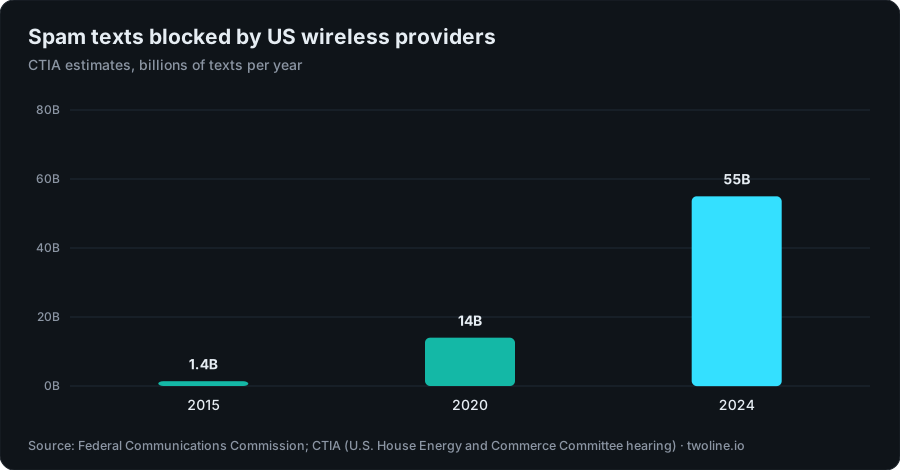
Chart data
| Year | Spam texts blocked |
|---|---|
| 2015 | 1.4B |
| 2020 | 14B |
| 2024 | 55B |
Why so much blocking? Because the scams pay. People reported $470 million in losses to text scams to the FTC in 2024, more than five times the 2020 figure.[1] In 2025, text was the top contact method in fraud reports that named one.[2]
| Figure | Value | Source |
|---|---|---|
| SMS and MMS messages exchanged in the US, 2024 | Nearly 2.2 trillion[5] | CTIA |
| Scam and spam texts blocked by US wireless providers, 2024 | More than 55 billion[4] | CTIA |
| Spam texts blocked, 2015 and 2020 | 1.4 billion and 14 billion[3] | FCC, citing CTIA |
| Top contact method in US fraud reports that named one, 2025 | Text message[2] | FTC |
| Length of a short code | Five or six digits[6] | CTIA |
| Wait after hitting Google's recovery-code limit | 24 hours[8] |
For how a code travels from an app's server to your phone, see how SMS OTP works.
Official help: Apple, Google, WhatsApp, Facebook and Instagram
Each platform's own recovery route beats any workaround. Start with these.
Apple ID verification code not received
For your Apple Account (what Apple ID is now called), choose "Didn't Get a Code?" or "Can't get to your devices?" on the code screen and have the code sent to your trusted phone number as a text or call. Check the Unknown Senders filter too. Apple's page: Get a verification code and sign in with two-factor authentication. For the filter itself: View conversations from unknown senders in Messages.
Verification code not received from Google
Look for a Google prompt on your signed-in devices, use only the newest code, and sign in from a usual device and place if you can. Google's pages: Fix common issues with 2-Step Verification and Common issues for ported numbers, shortcode blocks and request limits. If you're picking a number for a new Google account, I've written a separate guide on a phone number for Google verification.
Verification code not received on WhatsApp
Tap "Need help getting a code?", wait out the timer, then try "Call me". WhatsApp says the call option can leave the code on your voicemail in most regions, and that your carrier can confirm whether texts or calls to your number are being blocked or delayed.[9] WhatsApp's page: Can't complete registration.
Facebook confirmation code not received
Check the number on the account is right, re-send the SMS, or confirm with an email address instead. Meta's pages: I didn't receive the code from Facebook to confirm my mobile phone number and Troubleshoot login with two-factor authentication.
Instagram code not working
If a two-factor code can't be delivered, Instagram lets you finish logging in with a backup code, but only if you saved those codes while you were logged in. Instagram's page: How you can use a backup code on Instagram. Save a set today if you haven't.
When a new signup simply can't use your number
Already have the account? The recovery pages above are your way back in, not a new number. For any account you'll keep, your own number is the right goal. One case is left: a brand-new signup that won't accept your number type, or a one-off account where you'd rather not hand over your personal number at all. A one-time number is one option there, with real limits, and you can receive SMS codes on a one-time number for that single signup. It doesn't change an app's rules: if an app's terms bar temporary or burner numbers, use your own number. And keep your main WhatsApp on your own SIM.
TwoLine sells one number per code; the steps are in the guide linked below. Each number lasts long enough for one code, usually 10 to 20 minutes and sometimes shorter, and the order page shows the end time. When I checked the catalog on November 2, 2026, it listed 443 apps across about 190 countries; the cheapest line anywhere was $0.39, US Instagram numbers started at $0.39, US Google numbers at $0.46 and UK Telegram numbers at $0.65. Prices are live and change, so check pricing before you buy.
The missing-code problem doesn't vanish on a one-time number, because the app still decides what it sends and whether it accepts the number. So I wrote the refund rule around it: if no code arrives by the end of the window, the full price goes back to your TwoLine balance automatically, and you can cancel for a refund after 2 minutes. Once a code has been delivered, the purchase is final.
- One code, then it ends. It can't receive later codes, so don't use it for an account you'll need to log back into or recover.
- The app decides. Any app may refuse any number, whatever its line label.
- Not for money or identity. No numbers for banks, payment apps, money transfer, crypto exchanges, securities accounts or government identity services.
- Refunds go to balance, not your card. The details are on the refund page.
Free public "receive SMS" inbox sites aren't the same thing: anyone can read the codes there, which is why I wrote a guide to receiving SMS online safely. The buying steps, and more on how one-time numbers work, are in one-time phone numbers for verification.
Signing up somewhere new?
Locked out of an account you already have? A new number won't help, so use the official recovery pages above. For a brand-new sign-up you won't log back into, a one-time number is one option: live price first, the app still decides, and the full price returns to your TwoLine balance if no code arrives.
Check one-time numbersFAQ
Why am I not receiving verification codes by text?
The usual causes are no mobile signal, a wrong country code, a filter or spam folder hiding the text, a carrier block on short codes, or an app cooldown after too many requests. Check them in that order. If other texts arrive and only codes don't, look at your filters and your carrier first, because carriers block billions of spam texts a year,[4] and real codes sometimes get caught.
How long should I wait before requesting another verification code?
Wait the full timer the app shows before you ask again, and use only the newest code, since older ones stop working.[10] If Google says you've hit its limit on recovery codes, it tells you to wait 24 hours and try again.[8] WhatsApp says there's no way to make its wait shorter.[11]
Why is my iPhone not receiving verification codes?
Check the Unknown Senders filter in Messages first. If you had Filter Unknown Senders on in iOS 18, Screen Unknown Senders is on when you upgrade to iOS 26, so codes from new senders can land there.[7] You can keep alerts on for Time Sensitive messages, like codes, while screening the rest.
Where do verification codes go on Android?
If Google Messages thinks a text is spam, it can hide it in the Spam & blocked folder instead of delivering it to your main list.[12] Open that folder, find the code and tap Report not spam so the next one arrives normally. Other SMS apps, like Samsung's, keep their own blocked lists, so check those too.
Can my carrier block verification codes?
Yes. Many codes come from short codes, five- or six-digit numbers[6] built for bulk texting, and a line can have them blocked. Google's help page tells people to ask their carrier to unblock messages from services that use shortcodes.[8] Carrier spam filters can also delay or drop codes from apps whose sending setup looks suspicious.
Why am I not getting a verification code by email?
Check that you typed the right address at sign-up, then look in Spam or Junk. In Gmail, codes can also sit in an inbox tab: the Updates tab holds automated confirmations, notifications, statements and reminders.[17] If the code is in Spam, mark it Not spam; Gmail says future emails from that sender then won't go to Spam.[16] Request one new code and give it a few minutes.
About this article
Written by Serhat Doğan, founder of TwoLine. He's a London-based software developer who has built SMS verification tools full-time since early 2026. Disclosure: I built TwoLine, which sells one-time numbers for a single SMS code, so I have a stake in this topic. Every outside number in this guide links to its source below. TwoLine doesn't publish delivery measurements of its own, and no app promises to accept any number, ours included.
Find me on GitHub, LinkedIn and X. Read the refund policy, privacy policy and terms, or contact support.
Sources
- Federal Trade Commission, “Top text scams of 2024”, 2025-04-14. www.ftc.gov/news-events/data-visualizations/data-spotlight/2025/04/top-text-scams-2024 (accessed 2026-11-02)
- Federal Trade Commission, “Prepared Statement of the Federal Trade Commission on The Rising Scam Economy”, 2026-03-25. www.ftc.gov/system/files/ftc_gov/pdf/ftc-testimony-jec-hearing-on-the-rising-scam-economy.pdf (accessed 2026-11-02)
- Federal Communications Commission, “Targeting and Eliminating Unlawful Text Messages, Report and Order (FCC 23-21)”, 2023-03-17. docs.fcc.gov/public/attachments/FCC-23-21A1.pdf (accessed 2026-11-02)
- CTIA (U.S. House Energy and Commerce Committee hearing), “Testimony of Sarah Leggin, CTIA: Stopping Illegal Robocalls and Robotexts”, 2025-06-04. docs.house.gov/meetings/IF/IF02/20250604/118334/HHRG-119-IF02-Wstate-LegginS-20250604.pdf (accessed 2026-11-02)
- CTIA, “2025 Annual Survey Highlights”, 2025-09. api.ctia.org/wp-content/uploads/2025/09/2025-Annual-Survey-Highlights.pdf (accessed 2026-11-02)
- CTIA, “Messaging Principles and Best Practices”, 2023-05. api.ctia.org/wp-content/uploads/2023/05/230523-CTIA-Messaging-Principles-and-Best-Practices-FINAL.pdf (accessed 2026-11-02)
- Apple Support, “View conversations from unknown senders in Messages on your iPhone”, 2026-04-08. support.apple.com/en-us/125068 (accessed 2026-11-02)
- Google Account Help, “Common issues”. support.google.com/accounts/answer/148367?hl=en (accessed 2026-11-02)
- WhatsApp Help Center, “Can't complete registration”. faq.whatsapp.com/1120385166078156/?locale=en_US (accessed 2026-11-02)
- Google Account Help, “Fix common issues with 2-Step Verification”. support.google.com/accounts/answer/185834?hl=en (accessed 2026-11-02)
- WhatsApp Help Center, “Can't request another verification code without waiting”. faq.whatsapp.com/624702592469992/?locale=en_US (accessed 2026-11-02)
- Google Messages Help, “How Google protects your privacy with spam and scam protection”. support.google.com/messages/answer/9327903?hl=en (accessed 2026-11-02)
- Facebook Help Center, “Troubleshoot login with two-factor authentication on Facebook”. www.facebook.com/help/147926301947841?locale=en_US (accessed 2026-11-02)
- Federal Trade Commission, “SIM Swap Scams: How to Protect Yourself”, 2019-10-23. consumer.ftc.gov/consumer-alerts/2019/10/sim-swap-scams-how-protect-yourself (accessed 2026-11-02)
- Apple Support, “If you can't connect to Wi-Fi on your iPhone or iPad”. support.apple.com/en-us/111786 (accessed 2026-11-02)
- Gmail Help, “Fix issues with valid emails in Spam”. support.google.com/mail/answer/16457426?hl=en (accessed 2026-11-02)
- Gmail Help, “Add or remove inbox categories and tabs in Gmail”. support.google.com/mail/answer/3094499?hl=en&co=GENIE.Platform%3DDesktop (accessed 2026-11-02)