Phone Number for Google Verification: What the Errors Mean and Google's Own Fixes (2026)
The short answer
- Google asks for a phone number to confirm you're a real person and to stop spammers; its sign-up guide marks the step optional, but sometimes it's required.[1][2]
- "This phone number cannot be used for verification" and "used too many times" mean you've hit Google's per-number limits, and Google's official fix is a different number.[1]
- Your recovery phone is a separate, long-term job: Google says it should belong only to you, and in its 2019 study an SMS code to a recovery phone helped block 100% of automated bots.[4][6]
- A one-time number can get a single new account through sign-up, but never make it your recovery number, because it can't receive later codes.
A phone number for Google verification is any number that can receive the text or call Google sends to prove a real person is behind a new account or a sign-in. Google says it does this "to help protect you and stop spammers," and that phone verification is only sometimes required.[1] If Google rejects your number with "This phone number cannot be used for verification" or "This phone number has been used too many times for verification," you've hit a limit Google sets on purpose, and its official fix is simple: use a different number.[1]
The part most guides skip is the one that costs people their accounts: the number you verify with and the number you keep for recovery do two different jobs. I'm Serhat Doğan. I built TwoLine and run it from London, and it sells one-time numbers, so I have a stake in this. Below I go through what Google's errors mean, what Google itself tells you to try, and why a number you only hold for a few minutes must never end up as your recovery phone.
Google phone number verification: what is it?
Phone verification is a one-off check: Google sends a short code to a number, and you type it back to show you control that number. Google's help page says you need a mobile device for it, though a home phone works if you pick the call option, and that the charge is usually the same as a standard text or call on your plan.[1]
Will SMS codes go away? In February 2025 a Gmail spokesperson told Forbes that Google wants "to move away from sending SMS messages for authentication," and TechRadar reported on-screen QR codes as the planned replacement for Gmail sign-in.[12] As of November 2, 2026, Google's verification help page still offers a text or a call.[1]
This is where people get confused. In Google's own step-by-step sign-up guide, the phone step reads "Optional: Add and verify a phone number for your account."[2] Yet the verification help page says that before you create an account or sign in, "sometimes phone verification is required to confirm you're a real person."[1] Both are true. The step is optional on paper, and Google's systems decide case by case when they want proof anyway. You don't get to see that decision, and no setting on your side flips it.
There's one more line on Google's phone number page that matters for the rest of this guide. When you give Google your number, it says it will verify the number is yours, and it will "try to re-verify it from time to time to make sure that it's still yours."[3] So the check isn't always a one-time event. Hold on to that; it's the reason a short-lived number is fine for one step and wrong for the long haul.
Why Google asks for a phone number when you sign up or sign in
Google asks at two different moments, for two different reasons.
When you create an account
At sign-up, the phone check is mostly about abuse. Google limits how many accounts each phone number can create, and how many times a number can be used for verification.[1] A real phone costs money and is hard to fake at scale, so a per-number cap makes it expensive to churn out spam accounts. The cap is there to stop exactly that, so I won't suggest ways around it.
When you sign in
At sign-in, it's about you. Google's security team explains that when it sees a suspicious sign-in attempt, "say, from a new location or device," it asks for extra proof that it's really you, and that proof might be confirming you have access to a trusted phone.[6] A new laptop, a hotel Wi-Fi network or a fresh browser can all look new to Google.
2-Step Verification (2SV) is a sign-in setting that asks for a second proof, such as a phone prompt or a code, after your password. Google turned it on for people by default: it auto-enabled 2SV for over 150 million people and required it for over 2 million YouTube creators.[7][11] It then reported a 50% decrease in accounts being compromised among those users.[7] A Google spokesperson later told TechTarget the figure isn't a one-to-one comparison and doesn't reflect "success rates," so read it as a drop inside that group, not a promise for every account.[11]
A passkey is a sign-in credential stored on your device that you unlock with your fingerprint, face or screen lock instead of typing a code. By May 2024, passkeys had been used more than 1 billion times across over 400 million Google Accounts.[8] Why does that matter for a phone number question? Because Google's direction is plain from its own posts: a phone number is one proof among several, and a device you're already signed in on counts as proof too.[6][8]
Google not accepting my phone number for verification: what each message means
Google's help page lists only a few verification errors, and its wording is precise, so it's worth reading slowly.
"This phone number cannot be used for verification." Google's explanation: "To protect you from abuse, we limit the number of accounts each phone number can create."[1]
"This phone number has been used too many times for verification." Google's explanation: it limits "the number of times a phone number can be used for verification."[1]
Google doesn't publish either limit or any waiting period for these two errors, and the help page doesn't offer a way to reset one. So if a page promises you a set number of codes every few hours, or says to wait 24 hours, it isn't quoting Google.[1] Look closely at the fix it gives for the first error, though: a number "from a friend, family member, or a different carrier."[1] That last option hints that the block can be about the line itself, not just about how many times you've used it. If you're trying a number that dozens of strangers have already used, such as one from a free public inbox, it's likely past the cap long before you arrive. I've written more about that in why free phone number apps fail verification and how to receive SMS online safely.
| What you see | What it means | What to try |
|---|---|---|
| "This phone number cannot be used for verification" | Google caps how many accounts one number can create, and this number has hit that cap or can't be used for this check.[1] | Use a different number you control. Google also suggests a family member's or friend's number, or one on a different carrier.[1] |
| "This phone number has been used too many times for verification" | The number has been used for verification more times than Google allows.[1] | Use a different number. Retrying the same one isn't an official fix.[1] |
| The code text never arrives | Messages can be delayed in busy areas or when your carrier has problems.[1] | Wait a few minutes, or switch to the phone call option.[1] |
| "Google couldn't verify this account belongs to you" | Account recovery didn't get enough proof that the account is yours.[5] | You can try again. Use a device and place where you usually sign in, and answer every question.[5] |
| No option to change your recovery info | Something about how you're signing in looks different to Google.[4] | Try from a device or location you normally use, or the following week from the device you're on now.[4] |
If the code itself is the problem rather than the number, my guide to a verification code that never arrives covers delays, filtering and retries in more detail.
How to verify a phone number on Google: adding it, then the official fixes
Everything below comes from Google's own help pages. The first step is the normal route; the rest are ordered from the least effort to the most.
- Add the number in your Google Account. Open your Google Account, go to Personal info, then Phone, add the number and follow the steps on screen to verify it.[3] Google can then send the code by text or, if you choose, by call.[1]
- Wait a few minutes, then try the call option. If the text hasn't arrived, Google says to wait or ask for a phone call instead.[1] Give it a few minutes before you resend.
- Use a different number that's yours. For both limit errors, Google's fix is a different number.[1] A second SIM or a work phone you control can do the job. Google also names a friend's or family member's number. That's fine for the check itself, but think it through: whoever owns that phone may receive future codes for your account, so don't leave their number on as your recovery phone.
- Skip the phone step when the screen offers it. Google's sign-up guide marks the phone step optional.[2] If you see a skip option, you can take it and add your own recovery options afterwards. If you don't see one, Google wants a check for this sign-up.
- Sign in from a device and place Google already knows. Google's recovery tips say to use a computer, phone or tablet where you frequently sign in, the same browser you usually use, and a location where you usually sign in.[5] If you're signed in on your phone, Google says it can use a device-based challenge on that phone as proof.[6]
- Use "Try another way" and your recovery email. When Google offers a challenge you can't complete, its tips page points to "Try another way" and to an email address you've added to the account, such as a recovery email.[5]
- Answer every question if you end up in account recovery. Google says to take your best guess rather than skipping, and that wrong guesses won't kick you out of the process.[5]
One safety note while you're in the middle of this: Google says it never asks for your password or verification codes over email, a phone call or a message.[5] If someone "from Google" asks you to read a code back to them, it's a scam. I cover how SMS codes get stolen in is SMS 2FA safe.
Verification number vs recovery number: two different jobs
A verification number is the number you use to pass a single check, at sign-up or at a sign-in Google finds unusual. A recovery number is the one phone number Google keeps on your account to get you back in and to warn you when something looks wrong. Google lets you add only one recovery phone number, and says that if you're locked out, this number helps you get back into your account.[3]
Google lists what a recovery phone is used for: sending you a code if you're locked out, blocking someone from using your account without permission, making it easier to prove an account is yours, and telling you about suspicious activity.[4] That's a long-term job. Google's guidance for picking one is short:
"Use a mobile phone that gets text messages, belongs only to you, and that you use regularly and keep with you."[4]
Google even warns against using a Google Voice number as your recovery phone, because the code you'd need to get back in would go to an inbox you can't reach while you're locked out.[4] If Google is that cautious about its own phone service, you can see why a number you only hold for a few minutes is a non-starter.
The payoff for getting this right is large. In a year-long study with New York University and UC San Diego, Google found that an SMS code sent to a recovery phone number helped block 100% of automated bots, 96% of bulk phishing attacks and 76% of targeted attacks.[6] Those numbers only hold when the recovery phone is actually in your pocket.
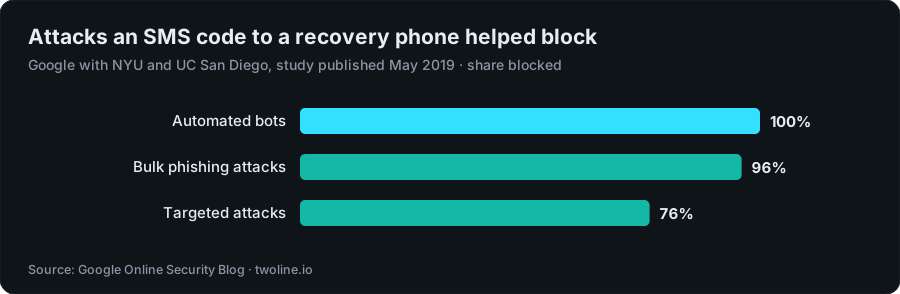
Chart data
| Attack type | Share blocked |
|---|---|
| Automated bots | 100% |
| Bulk phishing attacks | 96% |
| Targeted attacks | 76% |
Phone and account-safety figures from Google and Princeton
The figures from this guide, in one place. Most come from Google itself; one is university research on what happens to numbers after their owners let them go.
| Figure | What was measured | When |
|---|---|---|
| 100%, 96%, 76%[6] | Automated bots, bulk phishing and targeted attacks blocked by an SMS code sent to a recovery phone | Published May 2019 |
| Over 150 million[11] | People Google auto-enrolled in 2-Step Verification | Reported February 2022 |
| 50%[7] | Decrease in compromised accounts among those auto-enrolled users | Reported February 2022 |
| Over 400 million[8] | Google Accounts that had used passkeys, across more than 1 billion authentications[8] | May 2024 |
| 171 of 259[10] | Numbers offered to new subscribers at T-Mobile and Verizon that Princeton researchers found vulnerable to account hijackings at six popular sites, Google among them | 2021 |
Why a one-time number must never be your Google recovery number
A one-time number is a phone number you use to receive one SMS code for one app, after which the number ends and you can't get later texts on it. That's what I sell.
- It ends. A TwoLine number lasts long enough for one code, usually 10 to 20 minutes and sometimes less. After that, any code Google sends to it goes somewhere you can't reach.
- Google checks again. Google says it tries to re-verify numbers from time to time.[3] A number you no longer hold can't answer that.
- Numbers move on. Princeton researchers looked at numbers US carriers were offering to new customers and found that 171 of 259 they sampled were vulnerable to account hijackings at six popular websites, Google included.[10] That study was about ordinary carrier numbers, not verification services, but the lesson carries over: codes for your account follow the number, not you. I dig into how long reuse takes in how long before a phone number is reused.
- Google points at the same gap. In its 2025 post introducing Recovery Contacts, Google notes that proving ownership with "an SMS one-time code" can be hard if you've lost your phone or haven't updated your recovery phone number.[9]
So if a one-time number got you through sign-up, do two things the same day. Add a recovery phone that's yours, or at least a recovery email you check often, under Security & sign-in.[4] Then open the Phone section of your Google Account and remove the number you won't hold any more; Google's phone number page shows where the Delete option sits.[3] Don't wait until you're locked out: Google says you can't add recovery info while you're locked out or in the middle of account recovery.[4]
Phone number for Gmail verification: where a one-time number fits
TwoLine's one-number-per-code design fits exactly one Google case: a single new account where you understand Google may ask for a phone again later, and where you'll add your own recovery options straight away.
It's not a fit for your main Gmail, a work account, or anything holding years of photos, a business inbox or a payment method. Those deserve your own number from day one. And it's not for creating several accounts; the per-number limits exist to stop that, and TwoLine isn't built for bulk sign-ups.
If your case fits, the TwoLine side is short, and live countries and line types are on the Google verification numbers page. Choose Google, then a country and a line, and the live price shows before you pay or even sign up. Payment comes from your TwoLine balance. Paste the number into Google's phone screen, ask Google to send the code by text, and keep the order page open: that's where a code appears if Google sends one, and where the number's end time is shown.
When I checked the catalog on November 2, 2026, Google was listed in 194 countries and territories. US numbers started at $0.46, the cheapest US line labeled Premium · Non-VoIP was $1.22, and UK lines started at $0.39. Prices are live and change, so check current pricing or the US numbers page before you rely on them. Labels such as "Premium · Non-VoIP", "Standard+" and "Virtual" describe the kind of line (here's what a non-VoIP number is), and Google still decides whether it accepts any of them.
Where it stops working:
- Google can refuse any number, ours included. TwoLine publishes no delivery or success rate.
- Refunds go to balance. If no code arrives in time, the full price returns to your TwoLine balance, not your card; the refund policy has the details.
If you want the wider picture on when a single-use number makes sense, read one-time phone numbers for verification.
Phone number for Google account recovery: what to do if you lose access
Lost the phone, changed carriers, or realized your recovery number was never really yours? Here's Google's route back in, in the order I'd follow it.
- Go to Google's account recovery page and answer as many questions as you can. Take your best guess rather than skipping.[5]
- Use a familiar setup. The same computer or phone, the same browser and, if you can, the same place you usually sign in from.[5]
- Enter an email you can check right now that's connected to the account, such as your recovery email. Google may send a code there.[5]
- Ask a recovery contact, if you set one up. A recovery contact is a person you trust whom you've added to your account in advance. You share a code with them, they get an email or notification and confirm it's really you, and Google says they don't get access to your account or personal information.[9]
- Try again if Google says it couldn't verify you. Its tips page says you can, so give it another go from a better device or location.[5]
- Know the last resort. If you still can't sign in, Google's own suggestion is to create a replacement Google Account.[5]
The best recovery plan is the one you set up before you need it. A recovery phone that belongs only to you, a recovery email you actually read, and a recovery contact or two will cover most bad days.[4][9] Is your recovery phone still the number in your pocket today? It's a quick check under Security & sign-in, and Google's own research calls setting up a recovery phone one of the easiest things you can do to protect your account.[6]
Need one number for one Google code?
Choose Google, pick a country and a line, and see the live price before you pay. Google decides whether it accepts the number; if no code arrives before the window ends, the full price goes back to your TwoLine balance.
Check Google numbersFAQ
Why does Google ask for my phone number?
Google says phone verification is sometimes required before you create an account or sign in, to confirm you're a real person and to stop spammers.[1] It can also ask for extra proof, such as access to a trusted phone, when a sign-in looks unusual, for example from a new device or location.[6]
What does "This phone number cannot be used for verification" mean?
Google limits how many accounts each phone number can create, and this message means your number has hit that limit or can't be used for this check.[1] Google's fix is to use a different number, such as one from a family member, a friend or a different carrier. It doesn't publish the limit or offer a way to reset it.
How many times can a phone number be used for Google verification?
Google doesn't publish the number. Its help page says only that it limits how many times a phone number can be used for verification, and that you should use a different number once you see the "used too many times" message.[1]
Can I create a Google account without a phone number?
Sometimes, yes. Google's sign-up guide lists adding and verifying a phone number as optional.[2] Google also says phone verification is sometimes required, so if the screen gives you no skip option, you'll need a number that can receive the code.[1]
Can I use a virtual or one-time number for Google verification?
Google decides which numbers it accepts, and it can refuse any of them. A one-time number can suit a single new account, but it can't receive later codes, so it must never be your recovery phone. Google says a recovery phone should belong only to you and be one you use regularly and keep with you.[4] On TwoLine, if no code arrives before the window ends, the full price returns to your TwoLine balance.
What do I do if I lost the phone number on my Google account?
Use Google's account recovery page from a device, browser and place where you usually sign in, and answer every question as best you can.[5] If you added a recovery contact beforehand, they can confirm a code you share with them.[9] If recovery still fails, Google suggests creating a replacement account.[5]
About this article
Written by Serhat Doğan, founder of TwoLine. He's a London-based software developer who has built SMS verification tools full-time since early 2026. Disclosure: I built TwoLine, which sells one-time numbers for a single SMS code, so I have a stake in this topic. Every outside number in this guide links to its source below. TwoLine doesn't publish delivery measurements of its own, and no app promises to accept any number, ours included.
Find me on GitHub, LinkedIn and X. Read the refund policy, privacy policy and terms, or contact support.
Sources
- Google Account Help, “Verify your account”. support.google.com/accounts/answer/114129?hl=en (accessed 2026-11-02)
- Google Account Help, “Create a Google Account”. support.google.com/accounts/answer/27441?hl=en (accessed 2026-11-02)
- Google Account Help, “Change the phone number on your account & how it's used”. support.google.com/accounts/answer/3463280?hl=en (accessed 2026-11-02)
- Google Account Help, “Set up recovery options”. support.google.com/accounts/answer/183723?hl=en (accessed 2026-11-02)
- Google Account Help, “Tips to complete account recovery steps”. support.google.com/accounts/answer/7299973?hl=en (accessed 2026-11-02)
- Google Online Security Blog, “New research: How effective is basic account hygiene at preventing hijacking”, 2019-05-17. security.googleblog.com/2019/05/new-research-how-effective-is-basic.html (accessed 2026-11-02)
- Google (The Keyword), “Making you safer with 2SV”, 2022-02-08. blog.google/technology/safety-security/reducing-account-hijacking (accessed 2026-11-02)
- Google Online Security Blog, “Your Google Account allows you to create passkeys on your phone, computer and security keys”, 2024-05-02. security.googleblog.com/2024/05/passkeys-on-your-phone-computer-and-security-keys.html (accessed 2026-11-02)
- Google (The Keyword), “Recovery Contacts: Sign in with a little help from your friends and family”, 2025-10-15. blog.google/technology/safety-security/recovery-contacts-verify-google-account (accessed 2026-11-02)
- Princeton University (Kevin Lee and Arvind Narayanan), “Security and Privacy Risks of Number Recycling at Mobile Carriers in the United States”, 2021. recyclednumbers.cs.princeton.edu (accessed 2026-11-02)
- TechTarget, “Google: 2-step verification led to 50% fewer account hacks”, 2022-02-09. www.techtarget.com/searchsecurity/news/252513218/Google-2-step-verification-led-to-50-fewer-account-hacks (accessed 2026-11-02)
- TechRadar, “Google is ditching SMS - and will now use QR codes for Gmail account authentication”, 2025-02-25. www.techradar.com/pro/security/google-is-ditching-sms-and-will-now-use-qr-codes-for-gmail-account-authentication (accessed 2026-11-02)