One Time Phone Number for Verification: How It Works, What It Costs and When to Skip It (2026)
The short answer
- A one time phone number for verification receives one SMS code for one sign-up, then it ends, so it can't receive later codes for that account.
- As of November 2, 2026, TwoLine's cheapest numbers started at $0.39; a few apps, such as Telegram, cost more, and prices are live and change.
- Use one for sign-ups you won't need to recover. Don't use one for your main email, banking, work or anything protected by SMS two-factor sign-in.
- Apps decide whether to accept any number. Google, for one, limits how many accounts a single phone number can create.[1]
- Free public receive-SMS pages show your code to anyone who visits; a one-time number keeps it on your private order page.
What is a one time phone number for verification?
A one time phone number for verification is a number you use to receive a single SMS code for a single sign-up, after which the number ends and you can't use it again. That's the whole idea. You borrow a number for a few minutes, the app texts it a code, you type the code in, and you walk away without having handed that app your personal number.
You'll see the same thing called a one time use phone number, a single use phone number, a one-off phone number, a phone number for one time use or, since the window is short, a 10-minute phone number. A temporary phone number is the broader idea. They all mean the same: one number, one code, one app. It isn't a second line you keep, it isn't a free public inbox, and it isn't a stand-in for your own SIM. Each of those has a job, and I'll show where each one fits.
Two quick definitions before we go on. An OTP (one-time password) is the short code an app sends to prove you control a phone number; if you want the mechanics, I wrote them up in how SMS OTP works. A verification window is the stretch of time a one-time number stays open for that code to arrive.
I built TwoLine around exactly this model, one number per code. The prices below come from its live catalog as I checked it on November 2, 2026. If you're comparing providers rather than learning the concept, my earlier write-ups of temporary phone number services and disposable phone number services cover that side. This guide is about the thing itself: what it is, when it's the right tool and when it isn't.
Why apps ask for a phone number at all
It helps to know why the phone step exists, because it explains most of what happens later. Google's help page says phone verification is there to protect users from abuse, and that Google limits how many accounts each phone number can create.[1] A phone number takes effort to get and is tied to a carrier, so asking for one is a cheap way for an app to slow down anyone making accounts in bulk.
It also works. In a 2019 study of account takeovers, Google found that an SMS code sent to a recovery phone number helped block 100% of automated bot attacks, 96% of bulk phishing attacks and 76% of targeted attacks.[2] The data is old, but it's still the clearest public figure on why apps keep asking for a number.
SMS hasn't gone away, either. Okta's 2025 sign-in report found that 15.3% of users on its workforce sign-in platform still used SMS in January 2025, down from 17.5% a year earlier.[3] Texting itself is enormous: CTIA counted nearly 2.2 trillion SMS and MMS messages exchanged in the US in 2024, more than any year except 2020.[4] Apps reach for SMS because almost every phone can receive it.
Security bodies treat SMS as the weakest option that's still allowed. NIST's 2025 digital identity guidelines name exactly one "restricted" authenticator: sending codes over the phone network.[5] Restricted means allowed with extra risk checks, not banned. For you, that cuts two ways. Apps will keep asking for numbers at sign-up, and you shouldn't treat an SMS code as the main lock on an account you care about. My piece on whether SMS 2FA is safe charts that Google study and goes deeper on SIM swaps.
How a one time phone number for OTP works, step by step
If you're wondering how to get a one time phone number, the flow is short. On TwoLine it runs like this, and most per-code services follow roughly the same shape:
- Search the app you're signing up for. TwoLine's catalog lists 443 apps across about 190 countries.
- Pick a country and a line. A line is one offer for that app and country, with its own label and price. Labels include "Premium · Non-VoIP", "Standard+" and "Virtual".
- See the live price before you make an account. Prices are live and they change.
- Pay from your balance. The number is now yours for one code.
- Copy the number into the app's sign-up screen.
- Request the code in the app. Do this only after you've got the number, not before.
- Read the code on your order page and type it into the app.
The number stays open long enough for one code: usually 10 to 20 minutes, sometimes shorter. The order page shows the exact end time, so you're never guessing. After that, the number is gone from your side. You can't reopen it, and it won't receive a second code for you.
What if nothing arrives? I wrote the refund rule so you don't pay for silence. If no code reaches the order page before the window ends, the full price goes back to your TwoLine balance on its own. You can also cancel after 2 minutes and get the same refund. Once a code has been delivered, the purchase is final. Refunds return to your balance, not to your card. The details sit on the refund page, and if codes keep failing in a particular app, my checklist for a verification code that isn't received covers the usual causes.
What a one time phone number costs
Price depends on two things: the app and the country. Most apps are cheap almost everywhere, and a few cost noticeably more. The table below is a US slice of TwoLine's live catalog as of November 2, 2026, 10:19 UTC. The first column is the cheapest line of any type; the second is the cheapest Premium · Non-VoIP line. Prices are live and change, so treat this as a snapshot, not a quote.
| App | US, cheapest line | US, cheapest Premium · Non-VoIP line |
|---|---|---|
| Telegram | $0.93 | $2.04 |
| $0.46 | $1.22 | |
| $0.39 | $0.56 | |
| $0.39 | none listed | |
| TikTok | $0.39 | $0.39 |
| Snapchat | $0.39 | $0.39 |
| Microsoft | $0.39 | $0.39 |
| OpenAI | $0.39 | none listed |
"None listed" means the snapshot had no Premium · Non-VoIP line for that app in the US. The pattern is easy to read. As of November 2, 2026, most apps started at $0.39, which was the lowest price anywhere in the catalog. Telegram and Google cost more, at $0.93 and $0.46 for the cheapest US line. Premium · Non-VoIP lines usually cost more than the cheapest line for the same app, $2.04 for Telegram and $1.22 for Google, though for TikTok, Snapchat and Microsoft they also started at $0.39. Prices for other countries are in my virtual number for OTP guide.
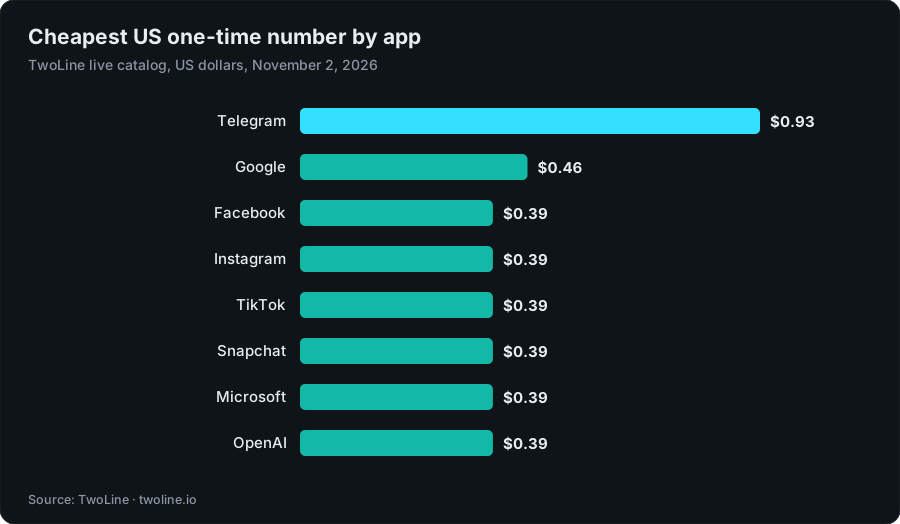
Chart data
| App | Cheapest US line |
|---|---|
| Telegram | $0.93 |
| $0.46 | |
| $0.39 | |
| $0.39 | |
| TikTok | $0.39 |
| Snapchat | $0.39 |
| Microsoft | $0.39 |
| OpenAI | $0.39 |
I've left WhatsApp out of this table on purpose. Its help center says VoIP, landline and toll-free numbers can't be registered,[16] and its registration checklist asks for an active SIM card in your phone for the number you register.[17] A one-time number is never in your phone, so a WhatsApp account belongs on your own SIM.
There's one more cost to know about. You pay from a TwoLine balance, and card top-ups come in fixed sizes: $5, $10, $25, $50 or $100 of balance for $4.99, $9.99, $24.99, $49.99 or $99.99. Crypto top-ups start at $9.99. So your first $0.39 number needs a $4.99 top-up, and the other $4.61 stays in your balance for later. Balance isn't cash, so top up what you expect to use. Current prices for every app are on the pricing page, and the app list is on receive SMS verification codes on a one-time number.
One-time number vs free receive-SMS pages vs a kept number vs your own SIM
People who search for a one time phone number free usually land on public receive-SMS pages. Others look at second-number apps, or just use their own SIM. This is how the four options compare on the questions that matter.
| Option | Who can read the code | Later codes for the same account | Cost | Good for |
|---|---|---|---|---|
| One-time number | You, on a private order page (never public) | No | From $0.39 per number on TwoLine as of November 2, 2026, after a $4.99 minimum top-up | One sign-up you won't need to recover |
| Free public receive-SMS page | Anyone who opens the page | Yes, and so can everyone else | Free | Nothing tied to you |
| Kept second number (monthly app or eSIM) | You | Yes, while you keep paying | A recurring fee | Accounts you'll keep but want apart from your personal number |
| Your own SIM | You | Yes | Already part of your phone bill | Email, banking, work and anything you must recover |
The free option is the trap. A public page shows every message to every visitor, so the code that opens your account is readable by strangers, and so is any reset code sent to that number later. Would you pin a spare house key to a public noticeboard? Those numbers also get used for sign-up after sign-up, and apps cap how often one number can be used; Google says so on its own help page.[1] I've covered the details in how to receive SMS online safely.
Free second-number apps are the other "free" route. They give you a number you keep, but it's typically an internet-based (VoIP) number, and some apps refuse those: Discord's help center says VOIP, burner and landline numbers can't be used.[13] Private one-time numbers cost money because someone has to supply a number that only you can read, and there's no subscription: you pay per number, only when you buy. If you'd rather not pay at all, your own SIM is the honest free option, at the price of giving that app your real number.
A kept number is the right call when you'll need codes again. TwoLine doesn't sell those. It sells one number for one code, and I'd rather point you to the right kind of product than sell you the wrong one. My page on second phone numbers explains the difference between a line you keep and a number you need once.
Which accounts a single use phone number suits, and which it doesn't
The rule I'd use is simple: if you'd be upset to lose the account, don't put a one-time number on it. The number can't receive later codes, and plenty of apps send a fresh code when you sign in on a new phone, reset a password or change a security setting.
Good fits
- A sign-up where the phone step is just a gate, such as trying a tool or joining a community you may never come back to.
- Keeping your personal number away from a service you don't trust with it yet.
- Testing your own app's sign-up flow with a real SMS from a country you don't live in.
- A new account where you'll add an email, a passkey or an authenticator app straight after sign-up.
Poor fits
- Your main email, or any account you use to sign in to other services.
- Messaging apps such as WhatsApp, tied to your number; WhatsApp's help center asks for an active SIM card in your phone for the number you register.[17]
- Any account that uses SMS for two-factor sign-in.
- Work, school and government accounts.
- Apps whose rules bar temporary or burner numbers.
- Banks, payment apps, money transfer, crypto exchanges and securities accounts. TwoLine doesn't sell numbers for these, or for government identity services.
Why be this strict? Because phone numbers don't stay with one person. Princeton researchers sampled 259 phone numbers that two US carriers listed as available on their number-change pages and found that 171 of them, about 66%, were still linked to an account on at least one of six websites they checked.[6] Whoever holds a number next can receive codes meant for the last person. With a one-time number, you lose access when the window closes, so anything still tied to that number is out of your hands. I go into reuse in how long before a phone number is reused.
If you've already signed up somewhere with a one-time number, there's a simple fix: add a stronger way in right away. If the app supports it, set up a passkey or an authenticator app and a recovery email, so the account doesn't hang on a number you no longer hold.
Why apps may refuse a one-time number
No one can promise that an app will accept a number, and that includes me. The app runs its own checks and changes them without notice. These are the usual reasons a number is refused or a code never shows up.
- Per-number limits. Apps cap how many accounts or verifications one number can be used for. Google's help page tells people who hit that cap to try a different number.[1]
- Number type. Many apps check whether a number is mobile, landline or internet-based (VoIP), and some turn VoIP away. That's the app's own choice: the 2025 revision of NIST's US federal guidelines dropped its earlier prohibition on VoIP numbers for out-of-band codes.[12] The term itself is explained on the non-VoIP number page. To test your own number, see how to check if a number is VoIP.
- Stated rules. Some apps bar whole categories of number in their help pages. Discord's, for one, rule out VoIP, burner and landline numbers.[13]
- Risk signals. NIST tells verifiers to weigh signs such as a recent SIM change or number porting before they send a code,[15] and apps can look at your device, network and sign-up pattern as well.
- Country fit. A number from one country and a sign-up from another can look odd to some apps, while others don't mind at all.
- App-side SMS rules. Apps decide when, where and how often they send texts. Telegram is a common question here, and I've explained its rules in Telegram's one-time SMS fee.
The line labels help, but they aren't guarantees. A Premium · Non-VoIP line is the one I'd try first for an app that's known to check number type, and it usually costs more. If the app's rules bar temporary or burner numbers, as Discord's do, use your own number instead. Virtual lines are usually the cheapest. Either way, the app decides. If no code arrives, you can cancel after 2 minutes or let the window close, and the full price comes back to your balance, so a refusal costs you time rather than money. If an app keeps refusing, check its own help center first; some apps offer email or a voice call as another way to verify.
The privacy upside: fewer copies of your real number
Every app that holds your personal number is one more place it can leak from, and one more list it can end up on. That isn't hypothetical. In April 2021, Facebook (now Meta) responded to reports that data from more than 530 million Facebook users had been made publicly available online, saying it was scraped before September 2019 by software that uploaded large sets of phone numbers to see which ones matched accounts.[9] Ireland's Data Protection Commission later fined Meta €265 million after an inquiry into the tools involved.[10]
A leaked number is also a number scammers can text. The FTC says consumers reported losing $470 million in 2024 to scams that started with a text message,[7] five times the 2020 figure, even though the number of reports went down.[11] Over the same years, the share of text-scam reports that involved a money loss more than doubled, from 5% in 2020 to 11% in 2024.[8]
A one-time number doesn't make you anonymous, and I won't pretend it does. The app still sees your device, your network and anything else you give it, and your TwoLine account holds your orders. What it does is keep your personal number out of one more database. For sign-ups you don't fully trust, that's a real gain. How many apps have your number today that you'd struggle to name?
Tips so you don't waste the window
A one-time number only gives you a few minutes, so a little preparation goes a long way. This is how to use a one time phone number without burning the window:
- Open the app's sign-up first. Get to the screen that asks for your number before you buy, so the clock isn't running while you fill in forms.
- Request the code once. Paste the number, ask for one code and watch the order page. Asking again and again can trip an app's limits.
- Use a Premium · Non-VoIP line for strict apps. If an app is known to check number type, start there where one exists, and skip apps whose rules bar temporary numbers.
- Add your own recovery straight away. A passkey, an authenticator app or a recovery email, so you're not stuck later.
Before you buy, it's worth a minute with my OTP verification number risk checklist. For app-specific notes, I've written guides on a phone number for Google verification and a phone number for social media verification.
The limits, plainly
I'd rather you hear these from me than find them out halfway through a sign-up:
- One code only. Each number receives one SMS code for one app, then it ends.
- No later codes. You can't come back for a login or reset code, so don't use one for an account you must recover.
- Apps can refuse any number. That includes Premium · Non-VoIP lines. TwoLine doesn't publish a delivery or success rate, and I won't guess one for your app.
- Some categories aren't sold. No numbers for banks, payment apps, money transfer, crypto exchanges, securities accounts or government identity services.
- Refunds go to balance. They don't go back to your card, and balance isn't cash.
- Short windows. Usually 10 to 20 minutes, sometimes less.
Used for what it's built for, a one-time number is a small, cheap way to keep your personal number out of sign-ups that don't need it. Used for an account you'll live in for years, it's an account you can lose. So, which kind of account are you about to create?
Find a number for your app
Search the app, pick a country and see the live price before you make an account. The app still decides whether to accept the number, and if no code arrives in the window, the full price returns to your balance.
Find a number for your appFAQ
What is a one time use phone number?
It's a phone number you use to receive one SMS verification code for one app, after which it ends. You don't keep it, and it can't receive later codes for that account. People also call it a single use phone number or a one-off phone number.
Is a one-time number the same as a burner number?
Not quite. A burner is usually a separate number you hold for one situation, such as selling something online, and may use for calls and texts for a while. A one-time number is narrower: it ends after a single code. Some apps bar burner numbers outright, Discord among them,[13] so check the app's rules first. The burner phone number page explains when each one fits.
How long does a one-time number last?
Long enough for one code. On TwoLine that's usually 10 to 20 minutes, sometimes shorter, and the order page shows the exact end time. The app still decides whether to send a code; if none arrives by the end time, the full price returns to your TwoLine balance automatically.
Can a one time phone number for OTP receive later login or reset codes?
No. A one-time number receives a single code and then ends, so it can't receive later login or password-reset codes. For accounts you'll keep, use your own number or a kept second number, and add a passkey or authenticator app where you can. NIST already treats SMS codes as a restricted authenticator.[5]
Will an app accept a one-time number for its verification code?
It depends on the app. Each one runs its own checks on number type, country and how often a number has been used, and those rules change. TwoLine doesn't publish a success rate and can't promise that any app will accept a number. If no code arrives, the full price comes back to your balance.
Can I get a one time phone number for free?
Free public receive-SMS pages exist, but anyone can read the codes, and apps limit how often one number is used: Google caps the accounts a number can create.[1] Free calling apps give you a number you keep, often an internet-based (VoIP) one, which some apps refuse.[13] The free option that works is your own SIM.
About this article
Written by Serhat Doğan, founder of TwoLine. He's a London-based software developer who has built SMS verification tools full-time since early 2026. Disclosure: I built TwoLine, which sells one-time numbers for a single SMS code, so I have a stake in this topic. Every outside number in this guide links to its source below. TwoLine doesn't publish delivery measurements of its own, and no app promises to accept any number, ours included.
Find me on GitHub, LinkedIn and X. Read the refund policy, privacy policy and terms, or contact support.
Sources
- Google Account Help, “Verify your account”. support.google.com/accounts/answer/114129?hl=en (accessed 2026-11-02)
- Google Security Blog, “New research: How effective is basic account hygiene at preventing hijacking”, 2019-05-17. security.googleblog.com/2019/05/new-research-how-effective-is-basic.html (accessed 2026-11-02)
- Okta, “The Secure Sign-in Trends Report 2025”, 2025. www.okta.com/newsroom/articles/secure-sign-in-trends-report-2025 (accessed 2026-11-02)
- CTIA, “2025 Annual Survey Highlights”, 2025-09. api.ctia.org/wp-content/uploads/2025/09/2025-Annual-Survey-Highlights.pdf (accessed 2026-11-02)
- National Institute of Standards and Technology (NIST), “SP 800-63B-4, Digital Identity Guidelines: Authentication and Authenticator Management”, 2025-07. pages.nist.gov/800-63-4/sp800-63b.html (accessed 2026-11-02)
- Princeton University, “Security and Privacy Risks of Number Recycling at Mobile Carriers in the United States”, 2021. recyclednumbers.cs.princeton.edu (accessed 2026-11-02)
- Federal Trade Commission, “New FTC Data Show Top Text Message Scams of 2024; Overall Losses to Text Scams Hit $470 Million”, 2025-04-16. www.ftc.gov/news-events/news/press-releases/2025/04/new-ftc-data-show-top-text-message-scams-2024-overall-losses-text-scams-hit-470-million (accessed 2026-11-02)
- Federal Trade Commission, “Top text scams of 2024 (Data Spotlight)”, 2025-04-14. www.ftc.gov/news-events/data-visualizations/data-spotlight/2025/04/top-text-scams-2024 (accessed 2026-11-02)
- Meta, “The Facts on News Reports About Facebook Data”, 2021-04-06. about.fb.com/news/2021/04/facts-on-news-reports-about-facebook-data (accessed 2026-11-02)
- Data Protection Commission (Ireland), “Data Protection Commission announces decision in Facebook "Data Scraping" Inquiry”, 2022-11-28. www.dataprotection.ie/en/news-media/press-releases/data-protection-commission-announces-decision-in-facebook-data-scraping-inquiry (accessed 2026-11-02)
- Federal Trade Commission, “New FTC Data Show Top Text Message Scams of 2024; Overall Losses to Text Scams Hit $470 Million”, 2025-04-16. www.ftc.gov/news-events/news/press-releases/2025/04/new-ftc-data-show-top-text-message-scams-2024-overall-losses-text-scams-hit-470-million (accessed 2026-11-02)
- National Institute of Standards and Technology (NIST), “SP 800-63B-4, Digital Identity Guidelines: Authentication and Authenticator Management (changes from SP 800-63B-3)”, 2025-07. pages.nist.gov/800-63-4/sp800-63b.html (accessed 2026-11-02)
- Discord Support, “How to Verify Your Discord Account”. support.discord.com/hc/en-us/articles/6181726888215-How-to-Verify-Your-Discord-Account (accessed 2026-11-02)
- TwoLine, “TwoLine pricing: live prices, balance top-ups and refund rules”, 2026-11-01. twoline.io/pricing (accessed 2026-11-02)
- National Institute of Standards and Technology (NIST), “SP 800-63B-4, Digital Identity Guidelines: Authentication and Authenticator Management”, 2025-07. pages.nist.gov/800-63-4/sp800-63b.html (accessed 2026-11-02)
- WhatsApp Help Center, “Can't complete registration”. faq.whatsapp.com/1120385166078156/?locale=en_US (accessed 2026-11-02)
- WhatsApp Help Center, “Can't complete registration”. faq.whatsapp.com/1120385166078156/?locale=en_US (accessed 2026-11-02)