Phone Number for Social Media Verification: Instagram, Facebook, TikTok, Snapchat and X (2026)
The short answer
- You usually don't need a phone number to sign up: Instagram, Facebook, TikTok, Snapchat and X all describe email as a sign-up route, though any of them may still ask for a number later.[9][12][14][16][20]
- A number tends to come up at a security check or a lockout, and X says the number you use to unlock gets associated with your account.[22]
- Recovery runs through the contact on file: Instagram says it can't give you access if you lose the sign-up email and never linked Facebook.[11]
- Platforms verify phones because fake accounts arrive at scale: TikTok removed 146,807,400 of them worldwide in Q2 2026 alone.[3]
- A one-time number can pass one code on a secondary account you recover by email, if the app accepts it. It's the wrong choice for a business or creator account.
Do you need a phone number for social media verification? Usually not to sign up. Instagram, Facebook, TikTok, Snapchat and X all list email as a sign-up route in their help pages or policies, though any of them may still ask for a phone number later, for example if a sign-up or login looks unusual. A number also comes into play when you turn on text-message login codes, or when you're locked out and need to prove the account is yours. Whatever number you hand over at that moment is the one the app will expect next time, so it deserves the same thought as a password.
I'm Serhat, and I built TwoLine, which sells one-time numbers: one number receives one SMS code for one app, and then it ends. So I have a stake in this. A one-time number can suit a secondary or privacy-first account that you recover by email. It's the wrong choice for a business or creator account you depend on. On November 2, 2026 I read each platform's own help pages and built this guide from them, with every claim linked to its source.
Why social apps verify phone numbers at all
Phone verification is a check where an app sends a short code by text message (sometimes by voice call) and asks you to type it back, which proves you control that number right now. For one real person it's a ten-second chore. For someone running thousands of fake accounts it's a cost on every single account, and that's the point.
The volumes the platforms fight are enormous. Meta says its detection technology helps it block millions of attempts to create fake accounts every day,[2] and it estimates that less than 5% of the daily active people it counts across its apps consisted solely of violating accounts.[1] TikTok removed 146,807,400 fake accounts worldwide between April and June 2026.[3] The quarter before, the figure was 86,288,705,[4] and the quarter before that, 147,716,518.[5] TikTok publishes the underlying data in its Community Guidelines Enforcement Report.
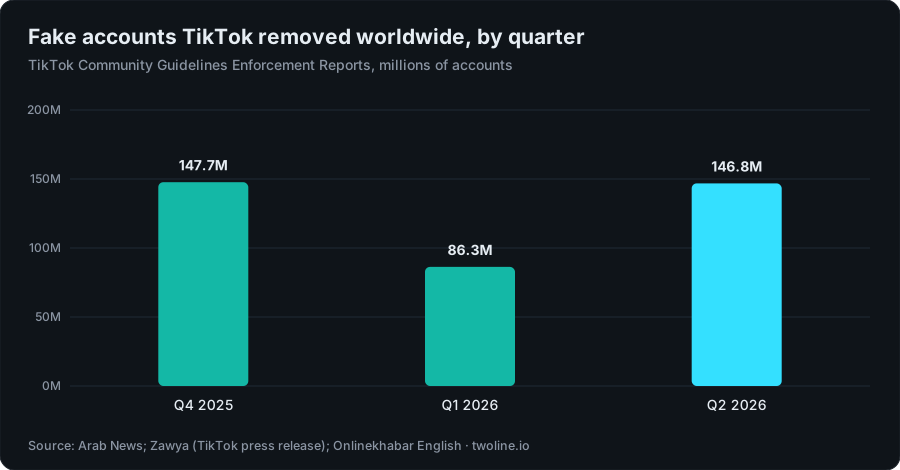
Chart data
| Quarter | Fake accounts removed (millions) |
|---|---|
| Q4 2025 | 147.7M |
| Q1 2026 | 86.3M |
| Q2 2026 | 146.8M |
Where does the phone prompt fit into that? Right at the door. TikTok's US operation said it removed 14.6 million fake accounts in the second quarter of 2026 and stopped another 64.8 million spam accounts from being created at all.[6] More than four times as many were blocked at sign-up as were removed afterwards, which may be why so many checks hit you before you've posted a thing. The original figures are in the TikTok USDS Joint Venture's Q2 2026 security report.
The other driver is money lost to scams. In 2025, nearly 30% of people who reported losing money to a scam to the US Federal Trade Commission said it started on social media,[7] and reported losses from those scams reached $2.1 billion, up from $261 million in 2020.[8]
So when an app suddenly wants your number, it usually isn't personal. An automated system saw something it didn't like, and real people get caught in those nets too. Knowing that helps you answer the check calmly, with a number you'll keep, instead of trying random numbers until one sticks.
Instagram, Facebook, TikTok, Snapchat and X at a glance
This is what each platform's own pages say, side by side. "Email instead" means the help page lists email as a sign-up route; the app can still ask for a phone later.
| Platform | Email instead? | When a number comes up | What recovery depends on |
|---|---|---|---|
| Yes, email or mobile at sign-up[9] | When Instagram asks you to confirm who's behind an account[10] | The sign-up email; no access if you lose it and never linked Facebook[11] | |
| Yes, but you must confirm the email or number[12] | Sign-up confirmation and password resets[12][13] | Emails or texts to the contact on the account[13] | |
| TikTok | Yes, email and/or phone at registration[14] | Login and password recovery[15] | A valid email and phone number[15] |
| Snapchat | Yes, "sign up with email instead"[16] | Sign-up,[16] plus limits on how many codes you request[18] | At least one verified email or mobile[19] |
| X (Twitter) | Yes, email or phone[20] | Locked accounts: verify by phone, email or reCAPTCHA[21] | The number on file, which X can detach if the account is inactive 45+ days and the number is added to a new account[24] |
None of the five help pages I read publishes a list of number types it refuses. If they did, the people they're trying to stop would read it too. What you get instead is a vague "this number can't be used" or a code that never arrives.
Phone number for Instagram verification
Do you need a phone number for Instagram?
Usually not. Instagram's sign-up steps let you enter either an email address or a mobile number and then confirm a code sent to whichever you picked. If you go with email, Instagram tells you to choose an address that only you can access,[9] because that inbox is how you get back in after a forgotten password. That one line is the best advice in this whole guide.
Instagram asking for phone number verification
The prompt usually lands on an account that already exists, after something looked off to an automated check. Instagram doesn't document every checkpoint, but it has said it asks people to confirm who's behind an account when it sees signs of inauthentic behaviour, and that if an account chooses not to confirm its information, its content may get reduced distribution or the account may be disabled.[10] In other words, the check isn't optional if you want to keep the account working.
If the account matters to you, answer with a number you'll still own next year. A number you can't receive texts on later turns the next security check into a lockout.
What happens when Instagram refuses a number?
You'll see an error, or the code simply won't come. Instagram doesn't say which numbers it accepts, so there's nothing to "fix" on the number itself. Try your own mobile, or use email where the screen offers it. I wouldn't cycle through a dozen numbers on the same checkpoint: rapid retries are exactly the kind of pattern these systems are built to notice. If codes are the problem rather than the number, my guide to verification codes that never arrive walks through the usual causes.
How Instagram recovery depends on the number
Recovery runs through whatever you signed up with. The hard edge: if you can't reach the email account you registered with and you never linked Instagram to Facebook, Instagram says it's unable to give you access to the account.[11] Whatever you used to sign up is, in practice, your only key. If you've weighed all that and still want a number just for the sign-up code, the Instagram verification numbers page lists live countries and line types.
Phone number for Facebook verification
Facebook's sign-up form takes an email address or a mobile number, and you have to confirm whichever you entered before the account is created.[12] So email works fine, as long as you can open the confirmation message.
Recovery runs through the same contact. Facebook's help for people who can't log in starts from one question: can you still receive its emails and text messages? If you can, it tells you to reset your password.[13] If you can't, you're on the harder path for lost contacts, and a disposable number you made your only contact puts you there for good.
What if Facebook refuses the number? Same story as Instagram: no published list, just an error or silence. Don't keep swapping numbers on the same screen; switch to email if the form allows it. For a Facebook account you use for family, Marketplace or a Page, your own SIM is the right answer. For a secondary profile, the Facebook verification numbers page shows what's live.
Phone number for TikTok verification
How to verify TikTok without a phone number
Sign up with an email address instead. TikTok's privacy policy describes registration with an email address and/or a telephone number.[14] If you just want to watch and post from a secondary account, email is the cleanest route.
One rule on TikTok's help page matters more than people expect: your email and phone number need to be valid, because TikTok uses them for login and password recovery.[15] An email you'll lose or a number you'll never see again both fail that test.
When TikTok refuses a number
TikTok's help pages don't say which numbers fail, so treat a refusal the way you would anywhere else: stop, and switch to email rather than trying number after number. Numbers also get reassigned, so a number that's new to you may already be tied to someone else's old account. I wrote up how long carriers wait before reusing a number if you want the details.
TikTok recovery
Because login and password recovery run through your email and phone,[15] a creator earning from TikTok should give it contacts they'll control for years. My guide to phone numbers for creators goes into what to use instead of your personal SIM. For a throwaway or test account that only needs one sign-up code, the TikTok verification numbers page lists live countries.
Phone number for Snapchat verification
Snapchat's sign-up flow asks for a phone number, but it offers a "sign up with email instead" option if you don't want to use one.[16] That makes Snapchat the easiest of the five to join without a phone.
Why won't Snapchat verify my number?
The most common reason is in Snap's own help: only one email and one mobile number can be verified per Snapchat account, and the same contact can't be shared across accounts.[17] A number already verified on another account, including one that was recycled from a previous owner, is a likely snag. The second is asking too often. A "Too many requests" error means you've requested too many SMS codes in a short time, and Snap suggests waiting 24 hours before trying again.[18]
Take that pause seriously. Hammering the resend button doesn't speed anything up, and it can lock you out of the very step you're trying to finish.
Snapchat recovery
Snap says you need access to at least one verified contact method, email or mobile, to verify your account,[19] and its help page adds that this is how you'll reset a forgotten password. Verify an email you own and your phone number stops being a single point of failure.
Phone number for Twitter (X) verification
X lets you sign up with an email address or a phone number, and it verifies an email sign-up with a confirmation email.[20] The phone tends to come up later. When X locks an account, it asks you to verify ownership by phone, email or reCAPTCHA,[21] and if you choose phone, X says it'll associate that number with your account.[22] Read that twice. A temporary number typed into an unlock screen doesn't vanish; it becomes your account's number.
X's phone FAQ adds that one number can be added to up to 10 accounts,[23] which is handy if you run a personal and a project account. It also describes reclaimed numbers: X can detach your number when your account has been inactive for 45 or more days and the same number is added to a new account by someone who can prove they own it.[24] Number recycling in action, and the reason an old number on a dormant account isn't a safe recovery plan.
For two-factor authentication on any of these apps, I'd pick an authenticator app or a security key over text messages wherever the app offers one. I covered why in my piece on SMS two-factor and SIM swaps.
Temporary numbers on social media: when they fit
A temporary phone number (also called a one-time number) is a number you use for a single verification code and don't keep. TwoLine sells exactly that. Whether it's a sensible choice depends on one question: will you ever need a second code on this account?
It can fit when:
- It's a secondary account, like a hobby profile, a test account or a private finsta you don't want tied to your personal number.
- You've verified an email you control, so recovery doesn't depend on the phone.
- You'd rather an app not hold your real number, for privacy reasons that are entirely legitimate.
It's the wrong tool when:
- It's a business, brand or creator account that earns money or holds an audience you can't rebuild.
- The account will run ads or hold payment details.
- You'd recover it by SMS, or you'd turn on text-message two-factor authentication.
And there's a line I won't help anyone cross. Using a fresh number to come back after a ban, to run batches of accounts or to pose as someone else is exactly what these checks exist to stop. If a platform disabled your account, use its appeal process. TwoLine isn't for getting around that, and nothing in this guide is meant to help with it.
The same logic applies outside social media. If you're weighing a number for a dating profile, my dating apps guide covers what changes there, and the Discord verification guide covers a platform that leans on phone checks for server safety. If you want to know why apps refuse some numbers, read how to check if a number is VoIP. If a one-time number does fit, live countries for every app are on the receive-SMS page.
What one code costs for these five apps
I checked TwoLine's live catalog on November 2, 2026 at 10:19 UTC. Prices are live and change, so treat these as a snapshot, not a quote.
| App | From (US) | From (UK) | Cheapest US Premium · Non-VoIP line | Countries listed |
|---|---|---|---|---|
| $0.39 | $0.39 | None listed that day | 194 | |
| TikTok | $0.39 | $0.39 | $0.39 | 190 |
| $0.39 | $0.39 | $0.56 | 194 | |
| Snapchat | $0.39 | $0.39 | $0.39 | 190 |
| X (Twitter) | $0.39 | $0.39 | None listed that day | 193 |
TwoLine labels its lines "Premium · Non-VoIP", "Standard+" or "Virtual"; the label tells you what kind of line it is (here's what a non-VoIP number means), not whether Instagram or TikTok will accept it. The app always decides. Full pricing lives on the pricing page.
You pick the app, a country and a line, see the price before you pay, and the code shows up on your order page if the app sends one. A number lasts long enough for one code, usually 10 to 20 minutes, and the order page shows when it ends. If no code arrives in that window, the full price goes back to your TwoLine balance automatically; the refund policy covers the rest.
What it won't do:
- Guarantee acceptance: any app may refuse any number, and TwoLine publishes no success rate.
- Receive a second code, so it's no use for an account you'll need to recover by SMS.
- Refund to your card: refunds go to your TwoLine balance.
- Cover banks, payment apps, money transfer, crypto exchanges, securities accounts or government identity services.
If you need a number you keep for months, that's a different product; my guide to second phone numbers you keep explains the options, and this guide to one-time numbers covers where they do and don't make sense.
Before you type any number into a social app
- Verify an email you control first. On all five platforms, email is a sign-up route, and it's the contact you're least likely to lose.
- Decide whether the account matters. If losing it would hurt your income or your audience, use your own SIM and stop reading here.
- Answer security checks with a number you'll keep. X says the number you use to unlock gets associated with your account.[22] Assume the others treat it the same way.
- Use an authenticator app for two-factor, not SMS. It survives a lost SIM and a recycled number.
- Don't hammer the resend button. Snapchat suggests waiting 24 hours after a "Too many requests" error.[18]
- If you're banned, appeal. Don't re-register with a new number.
Which of your accounts would you actually be able to get back tomorrow if your phone fell in a canal? If the honest answer is "not sure", fix the email on that account today: a few minutes now against a lockout later.
Need one code for a secondary account?
Pick the app and a country and see the live price before you pay, no account needed. The app decides whether to accept the number; if no code arrives in the window, the full price returns to your TwoLine balance.
Check live pricesFAQ
Do you need a phone number for Instagram?
Usually not. Instagram lets you sign up with an email address and tells you to choose one that only you can access.[9] Keep that email: if you lose it and never linked Facebook, Instagram says it's unable to give you access to the account.[11]
Why is Instagram asking for phone number verification?
An automated check decided something about your sign-up or login looked unusual, and Instagram wants to confirm a real person controls the account. Instagram has said that if an account chooses not to confirm its information, its content may get reduced distribution or the account may be disabled.[10] Answer with a number or email you'll still have later.
How do I verify TikTok without a phone number?
Sign up with an email address instead. TikTok's privacy policy describes registering with an email address and/or a telephone number,[14] and its help center says the contact details you give must be valid, because TikTok uses them for login and password recovery.[15]
Why won't Snapchat verify my number?
Snap allows one verified email and one verified mobile number per account and won't share them across accounts,[17] so a number already verified elsewhere is a likely snag. After a "Too many requests" error, Snap suggests waiting 24 hours.[18] You can also sign up with email instead.[16]
Can I use a temporary phone number for social media verification?
For a single code on a secondary account, a one-time number can work, but the app decides whether to accept it, and the number can't receive a later code. Verify an email you control and never rely on that number for recovery. On TwoLine, if no code arrives in the window, the full price returns to your balance. Don't use one for a business or creator account, or to come back after a ban.
Can one phone number be used on several social media accounts?
It differs by app. X lets you add one number to up to 10 accounts.[23] Snapchat allows one verified mobile number per account and won't share it across accounts.[17] For Instagram, Facebook and TikTok, check the app's own help before reusing a number on a second account.
About this article
Written by Serhat Doğan, founder of TwoLine. He's a London-based software developer who has built SMS verification tools full-time since early 2026. Disclosure: I built TwoLine, which sells one-time numbers for a single SMS code, so I have a stake in this topic. Every outside number in this guide links to its source below. TwoLine doesn't publish delivery measurements of its own, and no app promises to accept any number, ours included.
Find me on GitHub, LinkedIn and X. Read the refund policy, privacy policy and terms, or contact support.
Sources
- Meta Transparency Center, “Community Standards Enforcement Report: Fake Accounts (Facebook)”. transparency.meta.com/reports/community-standards-enforcement/fake-accounts/facebook (accessed 2026-11-02)
- Meta Transparency Center, “Community Standards Enforcement Report: Fake Accounts (Facebook)”. transparency.meta.com/reports/community-standards-enforcement/fake-accounts/facebook (accessed 2026-11-02)
- Onlinekhabar English, “TikTok removes more than 2 million videos from Nepal in three months”, 2026-10-30. english.onlinekhabar.com/tiktok-removes-more-than-2-million-videos-from-nepal-in-three-months.html (accessed 2026-11-02)
- Zawya (TikTok press release), “TikTok strengthens platform safety across MENA, removing more than 15.5mln violative videos in Q1 2026”, 2026-09-09. www.zawya.com/en/press-release/companies-news/tiktok-strengthens-platform-safety-across-mena-removing-more-than-15.5mln-violative-videos-in-q1-2026-483354 (accessed 2026-11-02)
- Arab News, “TikTok reinforces commitment to a safer digital space in MENA”, 2026-06-19. www.arabnews.com/media/tiktok-reinforces-commitment-to-a-safer-digital-space-in-mena-2647801 (accessed 2026-11-02)
- Social Media Today, “TikTok US shares Q2 account enforcement data”, 2026-10-25. www.socialmediatoday.com/news/tiktok-us-shares-q2-account-enforcement-data/833907 (accessed 2026-11-02)
- US Federal Trade Commission, “Reported losses to scams on social media eight times higher than in 2020”, 2026-04-27. www.ftc.gov/news-events/data-visualizations/data-spotlight/2026/04/reported-losses-scams-social-media-eight-times-higher-2020 (accessed 2026-11-02)
- US Federal Trade Commission, “Reported losses to scams on social media eight times higher than in 2020”, 2026-04-27. www.ftc.gov/news-events/data-visualizations/data-spotlight/2026/04/reported-losses-scams-social-media-eight-times-higher-2020 (accessed 2026-11-02)
- Instagram Help Center, “Create a new Instagram profile”. help.instagram.com/155940534568753 (accessed 2026-11-02)
- Instagram, “Introducing New Authenticity Measures on Instagram”, 2020-08-13. about.instagram.com/blog/announcements/introducing-new-authenticity-measures-on-instagram (accessed 2026-11-02)
- Instagram Help Center, “I Can't Log In”. help.instagram.com/374546259294234 (accessed 2026-11-02)
- Facebook Help Center, “Create a Facebook profile”. www.facebook.com/help/188157731232424 (accessed 2026-11-02)
- Facebook Help Center, “Recover your Facebook account if you can't log in”. www.facebook.com/help/105487009541643 (accessed 2026-11-02)
- TikTok, “Privacy Policy”, 2025-07-08. www.tiktok.com/legal/page/row/privacy-policy/en (accessed 2026-11-02)
- TikTok Help Center, “How to create an account”. support.tiktok.com/en/getting-started/creating-an-account/how-to-create-an-account (accessed 2026-11-02)
- Snapchat Support, “How to Create a Snapchat Account”. help.snapchat.com/hc/en-us/articles/7012333136788-How-to-Create-a-Snapchat-Account (accessed 2026-11-02)
- Snapchat Support, “I can't verify my email or mobile number”. help.snapchat.com/hc/en-us/articles/15616633664148-I-can-t-verify-my-email-or-mobile-number (accessed 2026-11-02)
- Snapchat Support, “I can't verify my email or mobile number”. help.snapchat.com/hc/en-us/articles/15616633664148-I-can-t-verify-my-email-or-mobile-number (accessed 2026-11-02)
- Snapchat Support, “I can't verify my email or mobile number”. help.snapchat.com/hc/en-us/articles/15616633664148-I-can-t-verify-my-email-or-mobile-number (accessed 2026-11-02)
- X Help Center, “Signing up with X”. help.x.com/en/using-x/create-x-account (accessed 2026-11-02)
- X Help Center, “Help with locked or limited account”. help.x.com/en/managing-your-account/locked-and-limited-accounts (accessed 2026-11-02)
- X Help Center, “Help with locked or limited account”. help.x.com/en/managing-your-account/locked-and-limited-accounts (accessed 2026-11-02)
- X Help Center, “Phone number FAQs”. help.x.com/en/managing-your-account/phone-number-faqs (accessed 2026-11-02)
- X Help Center, “Phone number FAQs”. help.x.com/en/managing-your-account/phone-number-faqs (accessed 2026-11-02)
Chart data