Is SMS 2FA Safe? SIM Swap Statistics, Risks and a Number Lock-Down Checklist (2026)
The short answer
- SMS 2FA is far better than a password alone: in Google's study, an SMS challenge to a recovery phone helped block 100% of bots, 96% of bulk phishing and 76% of targeted attacks.[1]
- It's still the weakest common second factor. NIST lists phone-network codes as its only restricted authenticator, and CISA tells highly targeted people not to use SMS as a second factor.[8][9]
- SIM swaps are the best-measured risk: the FBI's 2025 report shows $17.4 million in reported SIM swap losses, and UK cases recorded by Cifas rose 402% in the first half of 2026.[4][7]
- Set a carrier PIN and number lock, then move email, money and work accounts to passkeys, security keys or an authenticator app.
- Never put 2FA on a number you won't control for years, and that includes a one-time number.
Is SMS 2FA safe? Safe enough to beat a password on its own by a wide margin, and still the weakest second factor most people use. In a year-long Google study, an SMS code sent to a recovery phone helped block 100% of automated bots, 96% of bulk phishing attacks and 76% of targeted attacks.[1] The catch is that a text code is only as safe as your phone number, and numbers get stolen through SIM swaps and port-outs, read on carrier networks and phished in real time. Keep SMS where nothing better exists. Move the accounts that matter to a passkey, a security key or an authenticator app.
I'm Serhat Doğan, and I run TwoLine from London. Most of my working day is spent around SMS codes, which is exactly why I don't want you trusting them more than they deserve. Below you'll find the numbers on both sides, a ranking of second factors, and a checklist for locking down the phone number you already have.
Is SMS 2FA safe? The numbers in one place
Two definitions first. Two-factor authentication (2FA) means a login asks for a second proof on top of your password. SMS 2FA is the version where that second proof is a short code texted to your phone number.
That second sentence hides the whole problem. With SMS, you aren't proving "I hold this phone". You're proving "I control whatever device this number is routed to right now". Usually that's the same thing. When it isn't, the attacker gets your codes and you get a phone with no signal.
Here's the evidence this guide leans on. I've kept the "what was measured" column on purpose, because a percentage without its context is how security myths start.
| What was measured | Figure | Source |
|---|---|---|
| Bulk phishing attacks an SMS code helped block in Google's sign-in study (2019) | 96%[1] | |
| Targeted attacks an SMS code helped block in the same study | 76%[1] | |
| SIM swap complaints to the FBI in 2021 | 1,611[2] | FBI IC3 |
| SIM swap complaints to the FBI in 2023, 2024 and 2025 | 1,075, 982 and 971[11] | FBI IC3 |
| SIM swap losses reported to the FBI in 2021 | More than $68 million[2] | FBI IC3 |
| SIM swap losses reported to the FBI in 2022, the peak year | $72,652,571[3] | FBI IC3 |
| SIM swap losses reported to the FBI in 2023 | $48,798,103[3] | FBI IC3 |
| SIM swap losses reported to the FBI in 2024 | $25,983,946[3] | FBI IC3 |
| SIM swap losses reported to the FBI in 2025 | $17,366,758[4] | FBI IC3 |
| Unauthorised SIM swap cases recorded by Cifas (UK), 2024 | Nearly 3,000[13], up 1,055%[12] | Cifas |
| Change in unauthorised SIM swap cases recorded by Cifas (UK), 2025 | Up 38%[6] | Cifas |
| Change in unauthorised SIM swap cases recorded by Cifas (UK), January to June 2026 vs the same months of 2025 | Up 402%[7] | Cifas |
| "Restricted" authenticators in NIST SP 800-63B-4 (2025) | One: codes sent over the phone network (SMS or voice)[8] | NIST |
Read the table top to bottom and you get the honest answer. SMS 2FA stops most attacks, SIM swaps are a real and measured way around it, and the people who write the standards have already put it on notice.
Is SMS 2FA better than nothing? Yes, by a wide margin
Google ran its study with researchers from New York University and the University of California, San Diego, and published the results in May 2019.[1] When Google spotted a suspicious sign-in, it asked for extra proof. An SMS code sent to the account's recovery phone helped block every automated bot in the study, 96% of bulk phishing attempts and 76% of targeted attacks.[1] It was a sign-in challenge Google chose to show, not 2FA a user switched on, but the protection works the same way: the attacker doesn't have your phone.
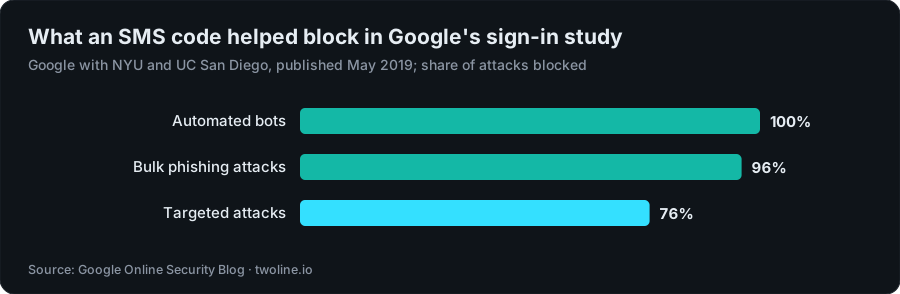
Chart data
| Attack type | Share an SMS code helped block |
|---|---|
| Automated bots | 100% |
| Bulk phishing attacks | 96% |
| Targeted attacks | 76% |
Why does a text code do so well against the first two groups? Because most account takeovers are cheap and automated. Someone buys a list of leaked passwords and tries them everywhere. A bot that has your password doesn't have your phone, so it stops there. Bulk phishing is similar: the attacker collects passwords at scale and rarely bothers to grab codes in real time from every victim.
Targeted attacks are a different story. Roughly one in four still got past the SMS check in Google's data, and the same post reports that Google's on-device prompts did better against that group.[1] A targeted attacker is willing to call your carrier, build a fake login page just for you, or sit and wait for the code. That gap is what the rest of this guide is about.
So my answer to "is SMS 2FA better than nothing" is a plain yes. If an account offers only SMS, turn it on today. If it offers something stronger, use that instead and treat SMS as the fallback you'd rather remove.
SMS 2FA security risks: five ways a text code fails
None of these need your phone in someone else's hands, which is exactly why they're worth understanding.
1. SIM swap attack
A SIM swap attack is when a criminal talks a mobile carrier into moving your phone service onto a SIM in a device they hold. The FBI defines it as social engineering against mobile service providers to transfer a victim's phone service to a device in the criminal's possession.[17] Your phone drops to "No service", their phone starts receiving your calls and texts, and every password reset that sends a code by SMS now goes to them.
How hard is it to talk a carrier into that? In a 2020 Princeton study, researchers tried it at five US prepaid carriers and found that all five used insecure authentication challenges that attackers can easily get around.[14] They also found 17 websites where user accounts could be compromised with a SIM swap alone.[15] Some carriers and sites have changed their checks since, and the researchers say their work was cited over 50 times in the FCC's 2023 rules,[19] but the study shows how much rests on a carrier employee's judgement.
2. Port-out fraud
Port-out fraud is the same theft through a different door: the criminal opens an account with another carrier and asks to move your number there. The FCC handles the two together, because both let bad actors take control of a phone account without ever gaining physical control of the phone.[5]
3. Interception on the network
Text messages aren't encrypted end to end. In CISA's words, SMS messages aren't encrypted, so a threat actor with access to a telecom provider's network who intercepts them can read them.[9] That covers abuse of the signalling systems carriers use to hand messages between networks, often called SS7 attacks, as well as a breached carrier. You can't fix this one from your side, except by not relying on SMS for accounts that matter.
4. Phishing relays
A fake login page asks for your password, then for your code, and passes both to the real site within seconds. NIST says any authenticator where you type the output by hand, which covers SMS codes and authenticator-app codes alike, can't be counted as phishing-resistant, because an impostor can relay that output to the real site and get in.[8] This attack doesn't care how well your carrier guards your SIM.
One habit helps here: a code you didn't ask for is a warning, not a mistake. It usually means someone has your password and is trying to log in. Change the password, and never read a code out to anyone who calls you, whoever they say they are.
5. A number you no longer control
Switch carriers carelessly, let a prepaid line lapse, or move abroad and stop paying, and the number eventually goes back into the pool. Whoever gets it next may receive your codes. I've written up how that works in how long before a phone number is reused. The short rule: before you give up a number, move every account off it.
SIM swap fraud statistics: FBI and Cifas, 2021 to 2026
The best long-run US numbers come from the FBI's Internet Crime Complaint Center (IC3), which counts the complaints people file with it. In 2021, IC3 received 1,611 SIM swapping complaints with adjusted losses of more than $68 million.[2] Reported losses peaked the next year at $72,652,571, then fell to $48,798,103 in 2023 and $25,983,946 in 2024.[3] In the FBI's 2025 report, SIM swap losses came to $17,366,758.[4]
Complaints fell much more slowly: 1,075 in 2023, 982 in 2024 and 971 in 2025.[11] On my arithmetic, that's about a 10% drop in complaints against a 64% drop in losses from 2023 to 2025, so the average reported loss per complaint went from about $45,400 to about $17,900.[4][11] Fewer dollars per victim, roughly the same number of victims coming forward.
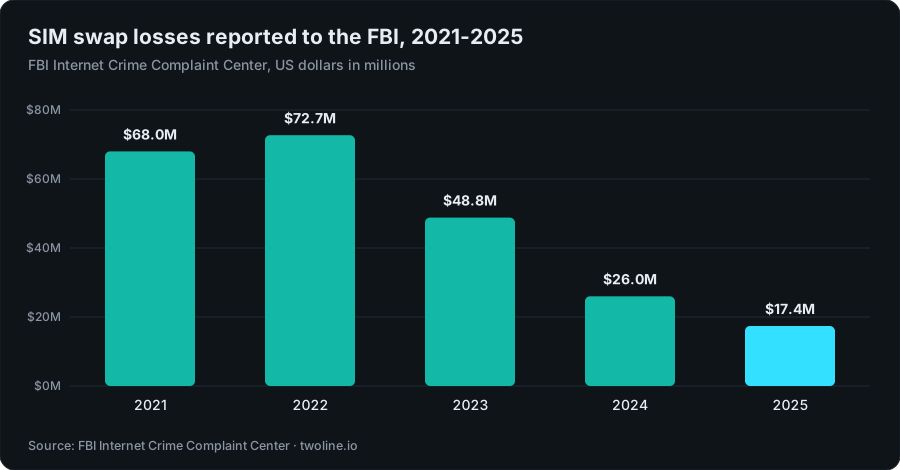
Chart data
| Year | Reported SIM swap losses |
|---|---|
| 2021 | $68.0M |
| 2022 | $72.7M |
| 2023 | $48.8M |
| 2024 | $26.0M |
| 2025 | $17.4M |
Is the US problem shrinking? Reported losses clearly are. I'd be careful reading more into it than that. IC3 only counts victims who file a complaint, and the report doesn't say why the figure fell. Carriers added account locks and the FCC tightened its rules in the same period, and it's reasonable to think that helped, but I haven't seen a published study that pins the drop on them.
The UK points the other way. Cifas, the fraud-prevention service whose members share fraud-risk cases through the UK's National Fraud Database, said in May 2025 that nearly 3,000 SIM swap fraud-risk cases were reported in 2024[13], a jump of 1,055% on the year before.[12] It then reported a further 38% rise in unauthorised SIM swaps in 2025, driven by stolen personal data and more automated attacks.[6] Its August 2026 update was sharper still: unauthorised SIM swap cases rose 402% in the first six months of 2026 compared with the same months of 2025.[7]
So there's falling reported loss in one country and fast-rising case counts in another. Those two facts don't cancel out. When a SIM swap works, every code sent to that number by text goes to the attacker, wherever you live.
What NIST, CISA, Microsoft and the FCC say about SMS
Official guidance has moved in one direction for years: keep SMS as a fallback, not a foundation.
- NIST, the US standards body, July 2025. The final SP 800-63B-4 lists exactly one "restricted" authenticator: sending codes over the phone network, by SMS or voice.[8] An organisation following NIST that accepts it must offer at least one unrestricted alternative, warn users about the risk, and plan for the day it's no longer allowed. NIST also tells verifiers to consider signals like a recent SIM change or number port before sending a code.[18]
- CISA, the US cyber agency, December 2024. Its mobile guidance says "Do not use SMS as a second factor for authentication."[9] It was written for highly targeted people, but the reasoning travels. It also says authenticator codes are better than SMS yet still phishable, that only FIDO authentication is phishing-resistant, and that adding an authenticator app doesn't remove SMS from the account by itself.[9]
- Microsoft, current documentation. Microsoft recommends users move away from text messages and voice calls for multifactor authentication, and points them to modern methods such as its Authenticator app.[10]
- The FCC, the US telecoms regulator, November 2023. Rules adopted on November 15, 2023 require wireless carriers to use secure methods to authenticate a customer before moving a number to a new device or provider, to notify customers of SIM change and port-out requests, and to offer an account lock.[5] Some parts were held back pending further approval, so check what your own carrier offers today instead of assuming.
None of them says to turn off 2FA if SMS is all you have. The message is: use something stronger where you can, and harden the number where you can't.
SMS 2FA vs authenticator app, passkeys, push and email
Three more definitions, a sentence each. A passkey is a sign-in credential stored on your device or in your password manager that proves who you are with a cryptographic key tied to the real website, so there's no code to type and nothing a fake site can reuse. A security key is a small hardware device that does the same job over USB or NFC. An authenticator app makes a fresh code, usually six digits, every 30 seconds by default,[16] from a secret stored on your phone, so the code never crosses the phone network.
The ranking below shows what each common factor actually defends against. It's mine, built on the NIST and CISA rules above.
| Rank | Second factor | What it stops | What can still beat it | Use it for |
|---|---|---|---|---|
| 1 | Passkey or hardware security key (FIDO) | Leaked passwords, SIM swaps, port-outs, network interception, fake login pages and code relays | Someone with your unlocked device, or a weak account-recovery route | Email, your Apple or Google account, password manager, work accounts |
| 2 | Authenticator app (time-based codes) | Leaked passwords, SIM swaps, port-outs, network interception | A fake login page that asks for the code; malware on the phone | Most accounts that don't offer passkeys yet |
| 3 | Push prompt in an app | Leaked passwords, SIM swaps, network interception | Prompt spam until a tired person taps Approve; relays when there's no number matching | Accounts that offer it, ideally with number matching |
| 4 | SMS or voice code | Leaked passwords, nearly all bots, most bulk phishing | SIM swaps, port-outs, network interception, code relays | Accounts with no better option; low-value logins |
| 5 | Email code | Leaked passwords for that one site | Anyone who's in your inbox; it's only as strong as your email account | Only when nothing else exists |
Why put email below SMS? Because an email code moves all the risk onto your inbox, and your inbox is usually the reset key for everything else. NIST doesn't allow email as an out-of-band authenticator at all.[8] If your email account is itself locked with a passkey, an email code is less bad, but it's still a code you can be phished for.
The gap between rank 1 and rank 2 matters more than people think. CISA's guidance says only FIDO authentication is phishing-resistant.[9] An authenticator app shuts out SIM swaps completely, but a convincing fake page can still ask you for the six digits, and you'll type them in.
SIM swap attack prevention: lock down your number
You can't stop every carrier mistake, but you can make your number a lot harder to steal. Do these in order.
- Set a carrier account PIN or passcode. Pick one you don't use anywhere else, and not your birthday or the last digits of your number. Ask your carrier where it's checked: in store, on the phone, online, or all three.
- Turn on the number lock or port-out protection. Carriers call it different things, such as SIM protection, number lock or port-out PIN. In the US, the FCC's 2023 rules require carriers to offer customers an account lock that blocks SIM changes and number ports.[5] In the UK, ask your network what SIM swap protection it has.
- Secure the email on your carrier account. If someone can reset your carrier login through email, the PIN doesn't help much. Give that inbox a unique password and a passkey or authenticator app.
- Make sure SIM change alerts reach you. US carriers have to notify customers of SIM change and port-out requests under the same rules.[5] Check that the alert goes somewhere you'll see it, like your email, not only a text to the number being stolen.
- Know the warning sign. If your phone suddenly shows no service or emergency calls only while people around you have signal, call your carrier from another phone straight away. Minutes matter.
- Move your important accounts off SMS. Email first, then your Apple or Google account, your password manager, money and work. Passkeys or security keys first, an authenticator app second.
- Remove SMS as a backup once the stronger factor works. CISA notes that enrolling an authenticator app doesn't automatically unenroll SMS, which leaves a weak fallback in place.[9]
- Save recovery codes offline. Print them or keep them in your password manager, so losing a phone doesn't push you back to SMS recovery.
- Set a PIN on the physical SIM. It won't stop a SIM swap at the carrier, but it stops a thief from putting your stolen SIM in another phone and reading your codes.
- Keep your main number off throwaway signups and public profiles. The fewer places your number sits next to your name, the less an attacker has to work with when they call your carrier pretending to be you. A private one-time number for sign-ups you won't keep keeps it out of one more form.
If it happens anyway, get the number back through your carrier first, then change your email and bank passwords from a device you trust, and report it. In the US that means the FBI's IC3, which is where every US loss and complaint figure in this guide comes from.[2] In the UK, report it to your network and your bank, then to the national fraud reporting service.
2FA without SMS: what to switch to, in order
Going SMS-free takes an evening if you go in the right order. Which account would hurt most if someone took it tonight? Start there, because it's usually the one that can reset all the others.
- Email. Add a passkey or security key, then an authenticator app as the second option, then save the recovery codes.
- Your phone platform account (Apple or Google). It holds your backups, saved passwords and often your passkeys.
- Password manager. Its master account deserves the strongest factor you've got.
- Money and work. Banks vary a lot. Many now offer approval inside their own app, which usually beats a text code. Use the strongest option yours gives you.
- Social and messaging. Most big platforms support authenticator apps, and a growing number support passkeys.
Two honest caveats. Some services still fall back to SMS during account recovery, and CISA itself admits it may not be feasible to remove SMS from every service.[9] For those, the carrier PIN and number lock above carry the weight. And not everyone has a smartphone or finds apps easy; for them, a hardware security key is often simpler than any app.
If you'd like the mechanics of what happens between a website and your phone when a code is sent, I've broken it down in how SMS OTP works. It shows why a code is only as private as the route it travels.
Where a one-time number fits, and where it never does
I built TwoLine, so here's my bias out in the open. TwoLine sells one-time numbers: one number receives one SMS code for one app, then the number ends. It's meant for signups you don't plan to keep, like a forum, a trial or an app you're testing, where you'd rather not hand over your real number.
It must never hold 2FA for an account you care about. A one-time number lasts long enough for one code, usually 10 to 20 minutes, and then it's gone. If that account later sends a login code or a recovery code, nothing will receive it for you, and a second factor exists for exactly those later moments. That's on purpose, and I'd rather lose a sale than have someone lock themselves out.
Four limits to know:
- One code only. No later codes, so it's not for any account you might need to recover.
- The app decides. It can refuse any number, and its rules change.
- No money or identity services. No banks, payment apps, money transfer, crypto exchanges, securities accounts or government identity services.
- Refunds go to balance. If no code arrives, the full price returns to your TwoLine balance, not your card; the refund policy has the rules.
Thinking about a separate number for a throwaway signup? Read the OTP verification number risk checklist first, then the guide to one-time phone numbers for verification. For everything you'd miss if it vanished, use your own number, lock it down, and put a passkey in front of it.
Keeping your number off a throwaway sign-up?
One number, one code, for signups you won't keep; never for 2FA or an account you'd need to recover. The app still decides, and the full price returns to your TwoLine balance if no code arrives.
See one-time numbersFAQ
Is SMS 2FA safe enough for a bank account?
It's better than no second factor, but use the strongest option your bank offers, which is often approval inside the bank's own app. If the bank only offers SMS, set a carrier PIN and number lock so the code is harder to redirect. NIST now treats SMS and voice codes as a restricted authenticator, and organisations following it must offer an unrestricted alternative.[8]
Is SMS 2FA better than nothing?
Yes. In Google's year-long study, an SMS code sent to a recovery phone helped block 100% of automated bots, 96% of bulk phishing attacks and 76% of targeted attacks.[1] Turn it on if it's the only option, and replace it as soon as something stronger is offered.
How common is SIM swap fraud in 2026?
In the US, the FBI's 2025 report shows $17,366,758 in reported SIM swap losses, down from $72,652,571 in 2022.[3][4] Complaints stayed close to level: 1,075 in 2023 and 971 in 2025.[11] In the UK, Cifas recorded a 402% rise in unauthorised SIM swap cases in the first half of 2026 compared with the first half of 2025.[7] The US figures only count complaints filed with the FBI, so they don't capture every case.
What's the difference between a SIM swap and port-out fraud?
A SIM swap moves your number onto a new SIM at your own carrier; port-out fraud moves your number to a different carrier. Both put your calls and texts, including 2FA codes, on a device the criminal holds. The US rules the FCC adopted on November 15, 2023 cover both.[5]
Can I use 2FA without SMS?
Yes. Use a passkey or hardware security key where it's offered and an authenticator app everywhere else. After setting one up, remove SMS as a backup if the service lets you, because enrolling an app doesn't remove SMS on its own.[9] Some services still use SMS for account recovery, so keep your carrier account locked too.
Should I use a virtual or one-time number for 2FA?
No. A one-time number receives one code and then ends, so it can't receive future login or recovery codes, and you could lose the account. Use your own long-term number, or better, an authenticator app or passkey. A one-time number only fits signups you don't need to keep, and even then the app decides whether to accept it.
About this article
Written by Serhat Doğan, founder of TwoLine. He's a London-based software developer who has built SMS verification tools full-time since early 2026. Disclosure: I built TwoLine, which sells one-time numbers for a single SMS code, so I have a stake in this topic. Every outside number in this guide links to its source below. TwoLine doesn't publish delivery measurements of its own, and no app promises to accept any number, ours included.
Find me on GitHub, LinkedIn and X. Read the refund policy, privacy policy and terms, or contact support.
Sources
- Google Online Security Blog, “New research: How effective is basic account hygiene at preventing hijacking”, 2019-05-17. security.googleblog.com/2019/05/new-research-how-effective-is-basic.html (accessed 2026-11-02)
- FBI Internet Crime Complaint Center, “Criminals Increasing SIM Swap Schemes to Steal Millions of Dollars from US Public”, 2022-02-08. www.ic3.gov/PSA/2022/PSA220208 (accessed 2026-11-02)
- FBI Internet Crime Complaint Center, “Internet Crime Report 2024 (crime types by complaint loss, 2024, 2023, 2022)”, 2025-04-23. www.ic3.gov/AnnualReport/Reports/2024_IC3Report.pdf (accessed 2026-11-02)
- FBI Internet Crime Complaint Center, “Internet Crime Report 2025 (crime types by complaint loss, 2025, 2024, 2023)”, 2026-04. www.ic3.gov/AnnualReport/Reports/2025_IC3Report.pdf (accessed 2026-11-02)
- Federal Communications Commission, via the Federal Register, “Protecting Consumers From SIM-Swap and Port-Out Fraud; Final Rule (FCC 23-95)”, 2023-12-08. www.govinfo.gov/content/pkg/FR-2023-12-08/html/2023-26338.htm (accessed 2026-11-02)
- Cifas, “Fraudscape 2026: Fraud cases hit record highs as criminals adapt and scale”, 2026-03-12. www.cifas.org.uk/newsroom/fraudscape2026 (accessed 2026-11-02)
- Cifas, “Nearly three in five (59%) fraud-risk cases linked to identity fraud, Cifas data shows (Fraudscape 2026 6 Month Update)”, 2026-08-04. www.cifas.org.uk/newsroom/fraudscape-2026-6-month-update (accessed 2026-11-02)
- National Institute of Standards and Technology (NIST), “SP 800-63B-4, Digital Identity Guidelines: Authentication and Authenticator Management”, 2025-07. pages.nist.gov/800-63-4/sp800-63b.html (accessed 2026-11-02)
- Cybersecurity and Infrastructure Security Agency (CISA), “Mobile Communications Best Practice Guidance”, 2024-12-18. www.cisa.gov/sites/default/files/2024-12/guidance-mobile-communications-best-practices.pdf (accessed 2026-11-02)
- Microsoft Learn, “Voice call authentication method - Microsoft Entra ID”, 2025-10-26. learn.microsoft.com/en-us/entra/identity/authentication/concept-authentication-phone-options (accessed 2026-11-02)
- FBI Internet Crime Complaint Center, “Internet Crime Report 2025 (crime types by complaint count, 2025, 2024, 2023)”, 2026-04. www.ic3.gov/AnnualReport/Reports/2025_IC3Report.pdf (accessed 2026-11-02)
- Cifas, “1,055% surge in unauthorised SIM swaps as mobile and telecoms sector hit hard by rising fraud”, 2025-05-07. www.cifas.org.uk/newsroom/huge-surge-see-sim-swaps-hit-telco-and-mobile (accessed 2026-11-02)
- Cifas, “1,055% surge in unauthorised SIM swaps as mobile and telecoms sector hit hard by rising fraud (case count)”, 2025-05-07. www.cifas.org.uk/newsroom/huge-surge-see-sim-swaps-hit-telco-and-mobile (accessed 2026-11-02)
- Princeton University Center for Information Technology Policy, “Is SMS 2FA Secure? An Empirical Study of Wireless Carrier Authentication for SIM Swaps (SOUPS 2020)”, 2020. www.issms2fasecure.com (accessed 2026-11-02)
- Princeton University Center for Information Technology Policy, “Is SMS 2FA Secure? An Empirical Study of Wireless Carrier Authentication for SIM Swaps (website findings)”, 2020. www.issms2fasecure.com (accessed 2026-11-02)
- Internet Engineering Task Force (IETF), “RFC 6238: TOTP, Time-Based One-Time Password Algorithm”, 2011-05. datatracker.ietf.org/doc/html/rfc6238 (accessed 2026-11-02)
- FBI Internet Crime Complaint Center, “Internet Crime Report 2025 (Appendix: crime type definitions)”, 2026-04. www.ic3.gov/AnnualReport/Reports/2025_IC3Report.pdf (accessed 2026-11-02)
- National Institute of Standards and Technology (NIST), “SP 800-63B-4, Digital Identity Guidelines: Authentication and Authenticator Management (PSTN risk indicators)”, 2025-07. pages.nist.gov/800-63-4/sp800-63b.html (accessed 2026-11-02)
- Princeton University Center for Information Technology Policy, “Is SMS 2FA Secure? An Empirical Study of Wireless Carrier Authentication for SIM Swaps (FCC rules)”, 2020. www.issms2fasecure.com (accessed 2026-11-02)